What is the importance of logging in Java applications?
Logging plays a crucial role in Java applications for various reasons. Here are some of the key importance of logging:
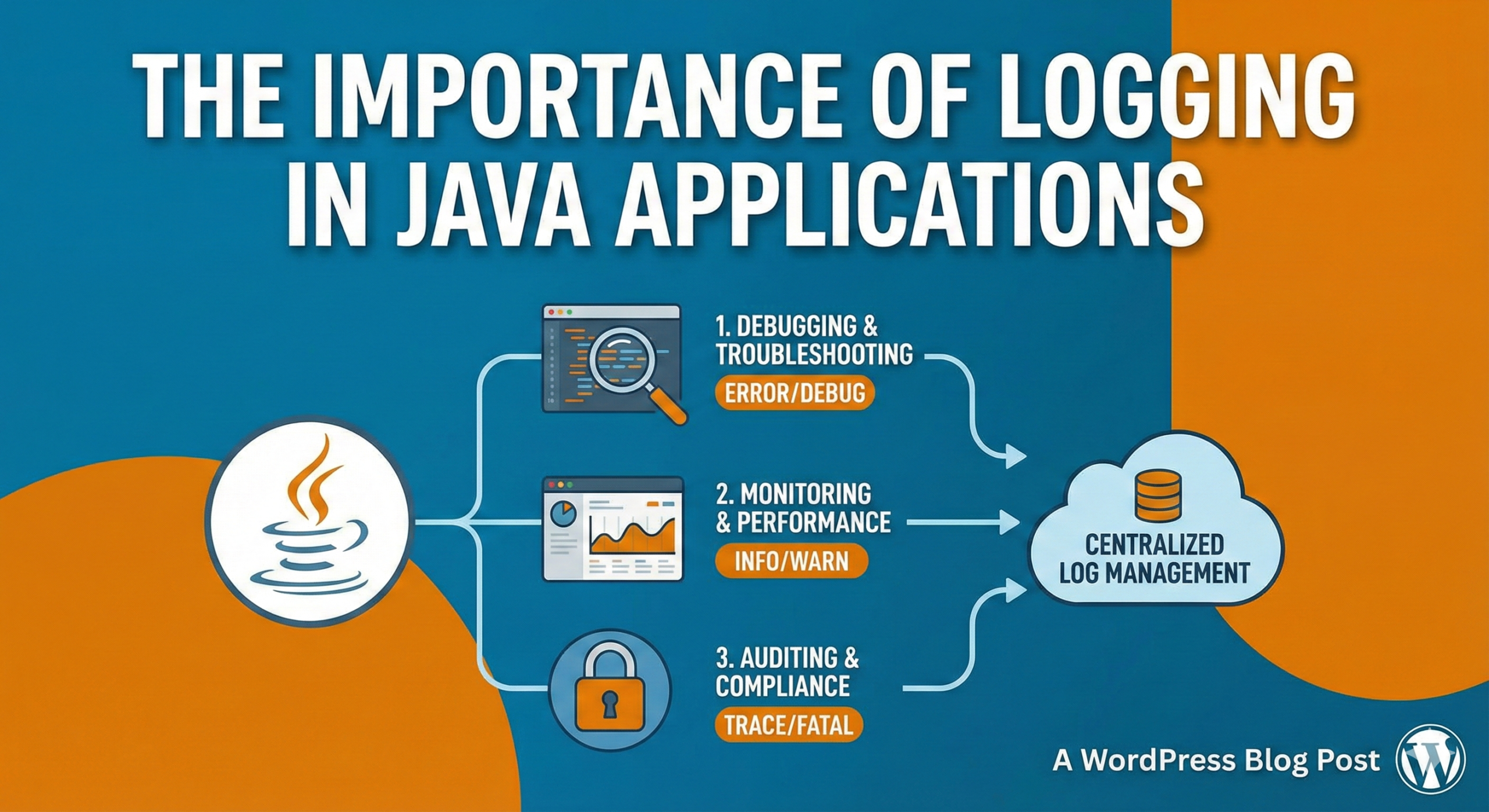
- Debugging and Troubleshooting: Logging provides a valuable mechanism for debugging and troubleshooting issues in Java applications. By logging relevant information such as error messages, stack traces, and variable values, developers can gain insights into the application’s behavior and identify the root cause of problems.
- Error Tracking and Monitoring: Logging allows developers and system administrators to track errors and exceptions that occur in a Java application. By recording these errors in logs, it becomes easier to monitor the application’s health, identify recurring issues, and take appropriate actions to resolve them.
- Auditing and Compliance: Logging is often essential for auditing and compliance purposes. It allows organizations to keep a record of important events and activities within an application. This can be useful for security, regulatory compliance, and tracking user actions.
- Performance Analysis: Logging can be used to analyze the performance of a Java application. By logging relevant metrics such as execution times, resource usage, and throughput, developers can gain insights into the application’s performance bottlenecks and make optimizations accordingly.
- System Monitoring: Logging can be integrated with monitoring systems to provide real-time insights into the health and status of a Java application. By monitoring log messages, administrators can proactively detect issues, track system metrics, and ensure that the application is functioning as expected.
- Historical Record: Logs serve as a historical record of an application’s activities. They provide a valuable source of information for post-mortem analysis, identifying patterns, and understanding the sequence of events leading up to a particular situation or issue.
- Security and Intrusion Detection: By logging security-related events and suspicious activities, Java applications can enhance their security posture. Logs can help in detecting potential security breaches, identifying unauthorized access attempts, and investigating security incidents.
In summary, logging in Java applications is crucial for debugging, troubleshooting, error tracking, performance analysis, system monitoring, auditing, compliance, security, and maintaining a historical record of application activities. It enables developers and system administrators to effectively manage, monitor, and improve the application’s functionality, performance, and security.
What information should be captured in logging?
When it comes to logging in Java applications, the information captured can vary depending on the specific requirements and context of the application. However, here are some common types of information that are often captured in logging:
- Log Levels: Log levels indicate the severity or importance of a log message. Common log levels include DEBUG, INFO, WARN, ERROR, and FATAL. Different log levels help in categorizing and filtering log messages based on their significance.
- Timestamp: Logging should include a timestamp to record when an event or log message occurred. This helps in understanding the chronological order of events and allows for easier troubleshooting and analysis.
- Source/Class/Method: It is essential to include information about the source of the log message, such as the class name, method name, or package name. This helps in identifying the specific component or code section responsible for generating the log message.
- Log Message: The log message itself should provide relevant and concise information about the event or situation being logged. It should be descriptive enough to understand the context but not overly verbose.
- Error/Exception Details: When logging errors or exceptions, it is crucial to capture relevant details such as the error message, stack trace, and any other relevant information that can help in diagnosing and resolving the issue.
- Request/Response Data: In web applications or APIs, capturing request and response data can be helpful for troubleshooting and auditing purposes. This may include information such as request parameters, headers, response codes, and any relevant payload data.
- User Context: If the application has user authentication and authorization, logging can include the user’s context, such as their username or ID. This can aid in tracking user actions, identifying the source of certain events, and auditing user behavior.
- Performance Metrics: Logging can capture performance-related metrics such as execution times, memory usage, CPU usage, and other relevant measurements. These metrics can help in performance analysis, identifying bottlenecks, and optimizing the application’s performance.
- Environmental Information: Logging should capture information about the environment in which the application is running. This may include details such as the server name, IP address, operating system, Java version, and any other relevant configuration information.
- Custom Contextual Information: Depending on the application’s requirements, it may be necessary to include additional contextual information in the log messages. This could be application-specific data, contextual identifiers, or any other information that helps in understanding the log event.
It’s important to note that the level of detail and the specific information to capture in logs should be determined based on the application’s needs, performance considerations, security requirements, and any relevant regulations or compliance standards that need to be followed.
What is SLF4J?
SLF4J (Simple Logging Facade for Java) is a logging facade or abstraction layer for Java applications. It provides a simple and unified API that allows developers to use different logging frameworks interchangeably without modifying their application code. SLF4J acts as a bridge between the application code and the underlying logging implementation.
Here are some key aspects and benefits of SLF4J:
- Logging Facade: SLF4J serves as a logging facade, which means it defines a set of logging APIs and interfaces that applications can use for logging purposes. It provides a consistent API regardless of the underlying logging implementation, allowing developers to switch logging frameworks easily.
- Backend Flexibility: SLF4J allows developers to choose and use their preferred logging implementation, such as Logback, Log4j 2, java.util.logging, or any other compatible framework. This flexibility enables developers to leverage the features and capabilities of different logging implementations without being locked into a specific framework.
- Ease of Migration: SLF4J simplifies the process of migrating from one logging framework to another. Since SLF4J provides a common API, developers can switch the underlying logging implementation by changing the SLF4J binding (JAR file) without needing to modify the application code that uses SLF4J.
- Performance Optimization: SLF4J is designed to be efficient and lightweight. It minimizes the overhead associated with logging by deferring the evaluation of log message parameters and reducing unnecessary string concatenations when log messages are not enabled for a specific log level. This optimization helps improve the performance of the application.
- Flexible Configuration: SLF4J supports flexible configuration options. Developers can configure the logging behavior through the chosen logging implementation’s configuration files or programmatically. This allows customization of log levels, log formats, output destinations, and other logging properties based on application requirements.
- MDC and Marker Support: SLF4J supports the use of MDC (Mapped Diagnostic Context) and markers. MDC allows developers to associate contextual information with a thread or request, which can be included in log messages. Markers provide a way to categorize log statements, enabling more fine-grained filtering and routing of log messages.
- Widely Adopted: SLF4J is widely adopted in the Java ecosystem and used by numerous libraries and frameworks. Many Java projects and frameworks have embraced SLF4J as their preferred logging facade, making it a popular choice for logging in Java applications.
To use SLF4J in a Java application, you need to include the SLF4J API JAR file as a dependency and also include a compatible logging implementation (e.g., Logback) along with its SLF4J binding JAR file. The SLF4J API can then be used in the application code to perform logging operations using the desired logging framework.
Overall, SLF4J simplifies logging in Java applications by providing a consistent API, allowing flexibility in choosing logging implementations, and facilitating easy migration between logging frameworks.
What are the maven dependencies needed to use SLF4J in our Java application?
For using the SLF4J API, we need the following dependency to be added in our pm.xml file:
<dependency>
    <groupId>org.slf4j</groupId>
    <artifactId>slf4j-api</artifactId>
    <version>2.0.7</version>
</dependency>
However, SLF4J delegates all the log instructions to one of the actual logging software like Java util logging, logback or apache log4j. The most popular one is apache log4j. For this we need a slf4j-log4j binding, which can be obtained using the following depdendency:
<dependency>
    <groupId>org.slf4j</groupId>
    <artifactId>slf4j-reload4j</artifactId>
    <version>2.0.7</version>
</dependency>
Log4j uses a configuration file log4j.properties for logging. Here is a sample file:
log4j.rootLogger=info, appender1, appender2

log4j.appender.appender1=org.apache.log4j.ConsoleAppender
log4j.appender.appender1.layout=org.apache.log4j.PatternLayout
log4j.appender.appender1.layout.ConversionPattern=[%5p] %d %-15t %c [%4L] %m%n

log4j.appender.appender2=org.apache.log4j.FileAppender
log4j.appender.appender2.file=logs/app-logs.txt
log4j.appender.appender2.layout=org.apache.log4j.PatternLayout
log4j.appender.appender2.layout.ConversionPattern=[%5p] %d %-15t %c [%4L] %m%n

log4j.logger.com.example=trace
The final step is to create the Logger object and call the log methods:
public class HelloLogger {
    static Logger log = LoggerFactory.getLogger(PrintPower.class);

    public static void main(String[] args) {
        log.trace("this is a trace message");
        log.debug("this is a debug message");
        log.info("this is an info message");
        log.warn("this is a warn message");
        log.error("this is an error message");
    }
}