Developing RESTful services using Crow CPP
Introduction to Crow
Overview of Crow framework
The Crow C++ micro-framework is a lightweight and efficient framework for building web applications in C++. It is designed to be fast, scalable, and easy to use, making it an excellent choice for developing high-performance web servers and APIs. Below is an overview of the key features and components of the Crow framework:
1. Lightweight and Fast:
- Crow is designed to be minimalistic and lightweight, providing only essential features for building web applications. This lightweight design ensures high performance and low overhead, making Crow well-suited for handling large volumes of requests efficiently.
2. HTTP Routing:
- Crow provides a simple yet powerful routing mechanism for handling HTTP requests. Routes are defined based on HTTP methods (GET, POST, PUT, DELETE, etc.) and URL patterns, allowing developers to specify how incoming requests should be processed.
3. Middleware Support:
- Crow supports middleware, which are functions or components that can intercept and process HTTP requests before they reach the route handler. Middleware can be used for tasks such as authentication, logging, error handling, and request preprocessing.
4. Templating Engine Integration:
- Crow seamlessly integrates with popular templating engines, such as Mustache or Handlebars, allowing developers to generate dynamic HTML content easily. Templating engines enable the separation of presentation logic from application logic, simplifying the development of web applications.
5. WebSocket Support:
- Crow includes built-in support for WebSocket, a communication protocol that enables real-time bidirectional communication between clients and servers. WebSocket support in Crow allows developers to build interactive and real-time web applications, such as chat applications or online gaming platforms.
6. Extensible and Customizable:
- Crow is highly extensible and customizable, allowing developers to extend its functionality or customize its behavior to suit specific project requirements. It provides hooks and extension points for integrating third-party libraries, middleware, or custom components seamlessly.
7. Error Handling and Logging:
- Crow provides robust error handling mechanisms for handling various types of errors that may occur during request processing. It also supports logging, allowing developers to log informational messages, warnings, errors, and debugging information for troubleshooting and monitoring purposes.
8. Cross-Platform Compatibility:
- Crow is designed to be cross-platform compatible, allowing developers to build web applications that can run on various operating systems, including Linux, macOS, and Windows. This cross-platform compatibility ensures that Crow-based applications can be deployed and run in diverse environments.
Example: Below is a simple example demonstrating how to create a basic Crow application that listens for HTTP requests on a specified port and responds with a “Hello, World!” message:
#include <crow.h>

int main() {
    crow::SimpleApp app;

    CROW_ROUTE(app, "/")
    ([]() {
        return "Hello, World!";
    });

    app.port(8080).multithreaded().run();

    return 0;
}
In this example:
- We include the Crow header file (
<crow.h>). - We create a
crow::SimpleAppinstance to represent our Crow application. - We define a route using the
CROW_ROUTEmacro, specifying the URL pattern (“/”) and a lambda function that returns the response content (“Hello, World!”). - We set the port number to 8080 using the
port()method. - We enable multithreaded mode using the
multithreaded()method. - Finally, we call the
run()method to start the Crow server and listen for incoming HTTP requests.
This simple example demonstrates how to create a basic Crow application with a single route handler.
Installation and setup
To set up Crow CPP framework in a CMake project, you’ll need to follow these steps:
Step 1: Download and Extract Crow:
- Download the Crow framework from its GitHub repository or an official release.
- Extract the Crow source code to a directory in your project.
Step 2: Configure CMakeLists.txt:
- Create or modify your project’s CMakeLists.txt file to include Crow in your build.
- Add the path to the Crow source code directory using
add_subdirectory()in your CMakeLists.txt file. - Link Crow to your executable target using
target_link_libraries().
Here’s an example of how your CMakeLists.txt file might look:
cmake_minimum_required(VERSION 3.10)
project(YourProjectName)

# Add Crow as a subdirectory
add_subdirectory(path/to/crow)

# Your project's executable
add_executable(YourExecutable main.cpp)

# Link Crow to your executable
target_link_libraries(YourExecutable PRIVATE crow)
Step 3: Write Your Application Code:
- Write your application code, including route handlers and other functionalities using Crow framework.
- You can create
.cppand.hfiles for your application logic.
Step 4: Build Your Project:
- Run CMake to generate build files for your project.
- Build your project using the generated build files (e.g.,
makeon Unix-like systems or open the generated solution file in Visual Studio on Windows).
Step 5: Run Your Application:
- After building successfully, you can run your executable to start your Crow-based web server.
Example: Here’s a simple example of a CMakeLists.txt file for a Crow-based project:
cmake_minimum_required(VERSION 3.10)
project(MyCrowProject)

# Add Crow as a subdirectory
add_subdirectory(libs/crow)

# Your project's executable
add_executable(MyWebServer main.cpp)

# Link Crow to your executable
target_link_libraries(MyWebServer PRIVATE crow)
In this example:
- We assume that the Crow source code is located in the “libs/crow” directory relative to the project root.
- We create an executable named “MyWebServer” from the source file “main.cpp”.
- We link the Crow library to our executable using
target_link_libraries().
Ensure that you replace “main.cpp” with the actual filename of your main application file, and adjust paths accordingly based on your project structure.
Building a simple web server with Crow
To build a simple web server with Crow, you’ll need to create a C++ source file and define routes for handling HTTP requests. Below is an example of a simple Crow-based web server that listens on port 8080 and responds with “Hello, World!” for all incoming requests:
Step 1: Create a C++ Source File (e.g., main.cpp):
#include <crow.h>

int main() {
    // Create a Crow application instance
    crow::SimpleApp app;

    // Define a route for handling GET requests to the root path ("/")
    CROW_ROUTE(app, "/")
    ([]() {
        return "Hello, World!";
    });

    // Run the Crow server on port 8080
    app.port(8080).multithreaded().run();

    return 0;
}
Step 2: Compile and Build the Application:
- Make sure you have Crow properly configured in your project, as described in the “Installation and Setup (for a CMake project)” section.
- Run CMake to generate build files for your project.
- Build your project using the generated build files (e.g.,
makeon Unix-like systems or open the generated solution file in Visual Studio on Windows).
Step 3: Run the Application:
- After successfully building your application, run the executable.
- Open a web browser and navigate to
http://localhost:8080to see the “Hello, World!” response.
This example demonstrates the basic structure of a Crow-based web server. You can expand upon it by adding more routes, handling different HTTP methods, integrating middleware, and implementing additional features as needed for your application.
Handling HTTP requests and responses
In Crow CPP framework, handling HTTP requests and responses involves defining route handlers to process incoming requests and generate appropriate responses. Below is an example demonstrating how to handle HTTP GET requests and send responses using Crow:
#include <crow.h>

int main() {
    // Create a Crow application instance
    crow::SimpleApp app;

    // Define a route for handling GET requests to the root path ("/")
    CROW_ROUTE(app, "/")
    ([]() {
        // Return a simple HTML response
        return "<h1>Hello, World!</h1>";
    });

    // Define a route for handling GET requests to the "/about" path
    CROW_ROUTE(app, "/about")
    ([]() {
        // Return a JSON response
        crow::json::wvalue response;
        response["message"] = "This is the About page";
        return response;
    });

    // Run the Crow server on port 8080
    app.port(8080).multithreaded().run();

    return 0;
}
In this example:
- We include the Crow header file (
<crow.h>). - We define two route handlers using the
CROW_ROUTEmacro. The first route handles GET requests to the root path (“/”), and the second route handles GET requests to the “/about” path. - Inside each route handler, we define the behavior for processing the request and generating the response:
- For the root route (“/”), we return a simple HTML response with the message “Hello, World!”.
- For the “/about” route, we return a JSON response with a message indicating that it is the About page.
- Finally, we configure the Crow server to listen on port 8080 using the
app.port(8080)method, enable multithreading with.multithreaded(), and start the server with.run().
When a client sends an HTTP GET request to the server, Crow will match the requested URL to the appropriate route handler based on the defined routes. The corresponding route handler will be executed, generating the response to be sent back to the client.
You can expand upon this example by defining more route handlers for handling different paths and HTTP methods, parsing request parameters, accessing request headers, and performing more complex logic to generate dynamic responses. Crow provides various utilities and features to facilitate handling of HTTP requests and responses effectively.
Important members of the request object
The request object in Crow CPP framework represents an incoming HTTP request received by the server. It provides access to various properties and attributes of the request, allowing developers to inspect and process the request data. Below are some important members of the request object in Crow along with detailed explanations:
method:- Explanation: Represents the HTTP method (GET, POST, PUT, DELETE, etc.) used in the request.
- Example:
req.methodreturns"GET"for a GET request,"POST"for a POST request, and so on.
url:- Explanation: Contains the URL path of the request.
- Example:
req.urlreturns"/users/123"for a request tohttp://example.com/users/123.
body:- Explanation: Contains the body of the HTTP request, if present (e.g., for POST requests).
- Example:
req.bodyreturns"{"name": "John", "age": 30}"for a POST request with JSON data.
remote_ip_address:- Explanation: Represents the IP address of the client making the request.
- Example:
req.remote_ip_addressreturns"192.168.1.100"for a request originating from that IP address.
headers:- Explanation: Provides access to the HTTP headers included in the request.
- Example:
req.get_header_value("User-Agent")returns the value of the User-Agent header.
url_params:- Explanation: Contains parsed URL parameters extracted from the request URL.
- Example:
req.url_params.get("id")returns the value of the “id” parameter from a URL like"/users?id=123".
query_string:- Explanation: Contains the raw query string portion of the request URL.
- Example:
req.query_stringreturns"page=2&sort=asc"for a request URL like"/items?page=2&sort=asc".
user_agent:- Explanation: Represents the User-Agent string sent by the client’s browser.
- Example:
req.user_agentreturns"Mozilla/5.0 (Windows NT 10.0; Win64; x64) AppleWebKit/537.36 (KHTML, like Gecko) Chrome/97.0.4692.99 Safari/537.36".
cookies:- Explanation: Provides access to the cookies sent with the request.
- Example:
req.get_cookie_value("session_id")returns the value of the “session_id” cookie.
multipart_data:- Explanation: Contains multipart form data, if the request is a multipart request.
- Example:
req.multipart_data.get_file("file")returns the uploaded file named “file”. is_websocket:- Explanation: Indicates whether the request is a WebSocket upgrade request.
- Example:
req.is_websocketreturnstrueif the request is a WebSocket upgrade request.
These members of the request object in Crow provide access to important details and data associated with incoming HTTP requests, enabling developers to implement various request processing logic and build robust web applications.
Important members of the response object
The response object in Crow CPP framework represents the HTTP response that the server sends back to the client in response to an incoming request. It provides various properties and methods for setting response headers, status codes, and content. Below are some important members of the response object in Crow along with detailed explanations:
code:- Explanation: Represents the HTTP status code of the response (e.g., 200 for OK, 404 for Not Found).
- Example:
res.code = 200sets the HTTP status code of the response to 200 (OK).
body:- Explanation: Contains the body of the HTTP response, typically the content to be sent back to the client.
- Example:
res.body = "Hello, World!"sets the response body to the specified string.
set_header:- Explanation: Method to set a custom HTTP header in the response.
- Example:
res.set_header("Content-Type", "text/plain")sets the Content-Type header to “text/plain”.
add_header:- Explanation: Method to add a custom HTTP header to the response. If the header already exists, it appends the new value.
- Example:
res.add_header("Access-Control-Allow-Origin", "*")adds the Access-Control-Allow-Origin header to allow cross-origin requests.
set_cookie:- Explanation: Method to set an HTTP cookie in the response.
- Example:
res.set_cookie("session_id", "abc123")sets a cookie named “session_id” with the value “abc123”.
redirect:- Explanation: Method to perform a redirect by setting the Location header and status code.
- Example:
res.redirect("/new-page")redirects the client to the “/new-page” URL.
write:- Explanation: Method to write data to the response body incrementally.
- Example:
res.write("Chunk 1")writes “Chunk 1” to the response body.
end:- Explanation: Method to send the response back to the client and end the response cycle.
- Example:
res.end()sends the response with the current response status code, headers, and body.
write_file:- Explanation: Method to stream a file as the response body.
- Example:
res.write_file("path/to/file.txt")streams the contents of “file.txt” as the response body.
set_static_file:- Explanation: Method to set a file to be served as a static file (for use with the
crow::mustachetemplate engine). - Example:
res.set_static_file("path/to/template.html")sets “template.html” as a static file for rendering with Crow’s template engine.
These members and methods of the response object in Crow provide developers with control over the content, headers, and status code of the HTTP response, enabling them to generate dynamic responses and interact with clients effectively.
Routing and Middleware
Understanding routing in Crow
Routing in Crow CPP framework involves defining routes to handle incoming HTTP requests based on the request method (GET, POST, PUT, DELETE, etc.) and URL patterns. Routes are defined using the CROW_ROUTE macro, which allows developers to specify the HTTP method, URL pattern, and a lambda function or handler to process the request. Below is an explanation of how routing works in Crow:
1. Basic Routing:
- To define a route in Crow, you use the
CROW_ROUTEmacro, followed by the desired HTTP method (e.g., GET, POST, PUT, DELETE) and the URL pattern. - You then provide a lambda function or handler as the second argument to the
CROW_ROUTEmacro. This function will be executed when the specified HTTP method and URL pattern match an incoming request.
Example:
#include <crow.h>

int main() {
    crow::SimpleApp app;

    // Define a route for handling GET requests to the root path ("/")
    CROW_ROUTE(app, "/")
    ([]() {
        return "Hello, World!";
    });

    // Define a route for handling POST requests to the "/submit" path
    CROW_ROUTE(app, "/submit")
    .methods(crow::HTTPMethods::Post)
    ([](const crow::request& req) {
        return "Received POST request with body: " + req.body;
    });

    app.port(8080).multithreaded().run();

    return 0;
}
In this example, the first route handles GET requests to the root path (“/”) and responds with “Hello, World!”. The second route handles POST requests to the “/submit” path and prints the request body in the response.
2. Route Parameters:
- Crow supports route parameters, allowing you to extract dynamic values from the URL path.
- Route parameters are specified within curly braces
{}in the URL pattern, and the corresponding values are passed to the route handler as function arguments.
Example:
#include <crow.h>

int main() {
    crow::SimpleApp app;

    // Define a route with a route parameter
    CROW_ROUTE(app, "/user/<int>")
    ([](int userId) {
        return "User ID: " + std::to_string(userId);
    });

    app.port(8080).multithreaded().run();

    return 0;
}
In this example, the route “/user/” specifies a route parameter for an integer value representing the user ID. The value of the user ID is passed to the route handler as an argument.
3. Query Parameters:
- Crow allows you to access query parameters from the request URL.
- Query parameters are parsed from the URL string and can be accessed using the
request.url_params.get()method.
Example:
#include <crow.h>

int main() {
    crow::SimpleApp app;

    CROW_ROUTE(app, "/search")
    ([](const crow::request& req) {
        std::string query = req.url_params.get("q");
        return "Search query: " + query;
    });

    app.port(8080).multithreaded().run();

    return 0;
}
In this example, the route “/search” retrieves the value of the “q” query parameter from the request URL and includes it in the response.
Routing in Crow provides a flexible and powerful mechanism for defining how incoming HTTP requests should be processed based on the request method and URL patterns. By leveraging route parameters and query parameters, you can build dynamic and interactive web applications with Crow.
Implementing route handlers
Implementing route handlers in Crow CPP framework involves defining functions or lambda expressions to process incoming HTTP requests matched by specific routes. Route handlers are responsible for generating appropriate responses based on the request context. Below are examples demonstrating how to implement route handlers in Crow:
1. Using Lambda Expressions:
Lambda expressions are commonly used to define inline route handlers directly within the route definition. They provide a convenient way to encapsulate request processing logic within a single function.
#include <crow.h>

int main() {
    crow::SimpleApp app;

    // Define a route with a lambda expression as the route handler
    CROW_ROUTE(app, "/")
    ([]() {
        return "Hello, World!";
    });

    // Define a route with a lambda expression accepting request parameters
    CROW_ROUTE(app, "/greet/<string>")
    ([](const crow::request& req, std::string name) {
        return "Hello, " + name + "!";
    });

    app.port(8080).multithreaded().run();

    return 0;
}
In this example, the first route (“/”) responds with “Hello, World!”, while the second route (“/greet/”) extracts the name parameter from the URL path and greets the specified name.
2. Using Member Functions:
You can also define route handlers as member functions of a class. This approach is useful for organizing route handlers into logical groups and facilitating code organization.
#include <crow.h>

class MyHandler {
public:
    void handleRoot() {
        // Route handler for the root path ("/")
        crow::response response("Hello, World!");
        response.end();
    }

    void handleGreet(const crow::request& req, std::string name) {
        // Route handler for the "/greet/<string>" path
        crow::response response("Hello, " + name + "!");
        response.end();
    }
};

int main() {
    crow::SimpleApp app;

    // Create an instance of MyHandler
    MyHandler handler;

    // Define route handlers using member functions of MyHandler
    CROW_ROUTE(app, "/").bind(&MyHandler::handleRoot, &handler);
    CROW_ROUTE(app, "/greet/<string>").bind(&MyHandler::handleGreet, &handler);

    app.port(8080).multithreaded().run();

    return 0;
}
In this example, handleRoot() and handleGreet() are member functions of the MyHandler class, responsible for handling requests to the root path (“/”) and the “/greet/” path, respectively. These member functions are bound to their respective routes using the bind() method.
Route handlers in Crow can be implemented using lambda expressions, free functions, or member functions, depending on the preferred coding style and requirements of the application. They provide a flexible and expressive way to define request processing logic and generate responses dynamically.
Working with route parameters and query strings
Working with route parameters and query strings in Crow CPP framework allows developers to extract dynamic values from the request URL and query parameters. Route parameters are part of the URL path, while query parameters are appended to the URL. Below are examples demonstrating how to work with route parameters and query strings in Crow:
1. Route Parameters:
Route parameters allow you to extract dynamic values from the URL path. You can specify route parameters using curly braces {} in the URL pattern, and the corresponding values are passed to the route handler as function arguments.
#include <crow.h>

int main() {
    crow::SimpleApp app;

    // Define a route with a route parameter
    CROW_ROUTE(app, "/user/<int>")
    ([](int userId) {
        return "User ID: " + std::to_string(userId);
    });

    app.port(8080).multithreaded().run();

    return 0;
}
In this example, the route “/user/” specifies a route parameter for an integer value representing the user ID. The value of the user ID is passed to the route handler as an argument.
2. Query Parameters:
Query parameters are key-value pairs appended to the URL after a question mark ?. Crow allows you to access query parameters from the request URL using the request.url_params.get() method.
#include <crow.h>

int main() {
    crow::SimpleApp app;

    CROW_ROUTE(app, "/search")
    ([](const crow::request& req) {
        // Retrieve the value of the "q" query parameter
        std::string query = req.url_params.get("q", "");
        return "Search query: " + query;
    });

    app.port(8080).multithreaded().run();

    return 0;
}
In this example, the route “/search” retrieves the value of the “q” query parameter from the request URL using req.url_params.get("q", ""). If the “q” parameter is not found in the URL, an empty string is returned.
Working with route parameters and query strings allows you to create dynamic routes and handle various types of requests effectively in your Crow-based web application. You can use these parameters to customize the behavior of your application and generate dynamic responses based on the incoming request context.
Handling GET requests
Handling GET requests in Crow CPP framework involves defining route handlers specifically for GET HTTP method. These handlers process incoming GET requests and generate appropriate responses. Below is an example demonstrating how to handle GET requests in Crow:
#include <crow.h>

int main() {
    crow::SimpleApp app;

    // Define a route for handling GET requests to the root path ("/")
    CROW_ROUTE(app, "/")
    ([]() {
        return "Hello, World!";
    });

    // Define a route for handling GET requests to the "/about" path
    CROW_ROUTE(app, "/about")
    ([]() {
        return "This is the About page.";
    });

    // Define a route with route parameters for handling GET requests
    CROW_ROUTE(app, "/user/<string>")
    ([](const crow::request& req, std::string username) {
        return "Hello, " + username + "!";
    });

    app.port(8080).multithreaded().run();

    return 0;
}
In this example:
- We include the Crow header file (
<crow.h>). - We define route handlers using the
CROW_ROUTEmacro, specifying the HTTP method (GET) and the URL pattern. - Inside each route handler, we define the behavior for processing the GET request and generating the response.
- For example, the first route (“/”) responds with “Hello, World!”, the second route (“/about”) responds with “This is the About page.”, and the third route (“/user/”) responds with a personalized greeting using the username extracted from the URL.
When a client sends an HTTP GET request to the server, Crow will match the requested URL to the appropriate route handler based on the defined routes. The corresponding route handler will be executed, generating the response to be sent back to the client.
You can define as many GET request handlers as needed to handle various paths and serve different types of content in your Crow-based web application. GET request handlers are useful for retrieving resources, displaying information, and responding to client requests in a RESTful manner.
Handling POST requests
Handling POST requests in Crow CPP framework involves defining route handlers specifically for the POST HTTP method. These handlers process incoming POST requests and generate appropriate responses. Below is an example demonstrating how to handle POST requests in Crow:
#include <crow.h>

int main() {
    crow::SimpleApp app;

    // Define a route for handling GET requests to the root path ("/")
    CROW_ROUTE(app, "/")
    ([]() {
        return "Hello, World!";
    });

    // Define a route exclusively for handling POST requests to the "/submit" path
    CROW_ROUTE(app, "/submit").methods("POST"_method)
    ([](const crow::request& req) {
        // Access the request body
        std::string body = req.body;

        // Process the request body
        // Here, you can parse the body, perform validation, or save data to a database
        // For demonstration, simply echoing back the received data
        return body;
    });

    app.port(8080).multithreaded().run();

    return 0;
}
In this example:
- We include the Crow header file (
<crow.h>). - We define route handlers using the
CROW_ROUTEmacro with themethods("POST"_method), specifying the HTTP method (POST) and the URL pattern (“/submit”). - Inside the POST route handler, we access the request body using
req.body, which contains the data sent by the client in the POST request. - We can then process the request body as needed. For demonstration purposes, we’re simply echoing back the received data.
- When a client sends an HTTP POST request to the server, Crow will match the requested URL to the appropriate route handler based on the defined routes. The corresponding route handler will be executed, generating the response to be sent back to the client.
You can define as many POST request handlers as needed to handle different endpoints and process incoming data in your Crow-based web application. POST request handlers are commonly used for submitting data, creating resources, and performing actions that modify server state.
Introduction to middleware and its role in Crow applications
Middleware in Crow applications serves as a flexible and powerful tool for intercepting and processing HTTP requests and responses. It plays a crucial role in managing cross-cutting concerns and adding additional functionality to the application without directly modifying individual route handlers. Here’s a breakdown of middleware and its role in Crow applications based on the provided documentation:
1. Intercepting Requests and Responses:
- Middleware functions are executed in the request-response cycle, allowing them to intercept both incoming requests and outgoing responses.
- Middleware intercepts requests before they are handled by route handlers, enabling developers to preprocess requests, perform validation, or enforce security measures.
2. Implementing Common Functionality:
- Middleware provides a centralized mechanism for implementing common functionality that applies to multiple routes or the entire application.
- Developers can encapsulate common tasks such as authentication, authorization, logging, error handling, request preprocessing, and response post-processing within middleware functions.
3. Modular and Reusable Architecture:
- By encapsulating functionality into middleware components, Crow applications maintain a modular architecture that promotes code reusability and maintainability.
- Middleware functions can be organized into reusable modules, enabling developers to easily add, remove, or modify middleware to adjust the application’s behavior without impacting individual route handlers.
4. Cross-cutting Concerns:
- Middleware allows developers to address cross-cutting concerns that span multiple components or layers of the application.
- Common cross-cutting concerns such as security, logging, caching, and rate limiting can be implemented in middleware, ensuring consistent behavior across the application.
5. Flexibility and Extensibility:
- Crow’s middleware architecture provides flexibility and extensibility, allowing developers to customize and extend the application’s functionality according to specific requirements.
- Developers can compose middleware chains by registering multiple middleware functions with the application, enabling complex processing workflows tailored to the application’s needs.
6. Example Usage:
- In the provided documentation, an example middleware (
AdminAreaGuard) demonstrates how to restrict access to certain routes based on the client’s IP address. - This middleware intercepts incoming requests, checks the remote IP address against a predefined admin IP address, and responds with a 403 Forbidden status code if access is denied.
Overall, middleware in Crow applications enhances the application’s flexibility, maintainability, and extensibility by providing a centralized mechanism for managing common functionality and addressing cross-cutting concerns. It enables developers to build robust and scalable web applications with ease while promoting code reuse and modularity.
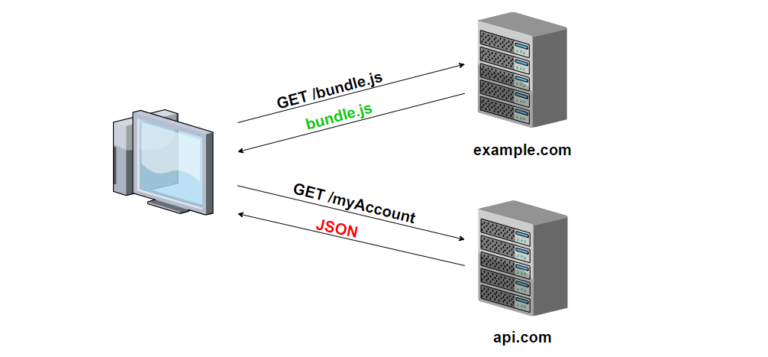
Here’s how you can implement a CORS (Cross-Origin Resource Sharing) middleware in Crow CPP framework:
#include <crow.h>

// CORS middleware to handle Cross-Origin Resource Sharing
struct CorsMiddleware {
    struct context {};

    // Middleware function to add CORS headers to responses
    void before_handle(crow::request&, crow::response& res, context&) {
        // Add CORS headers to allow requests from any origin, methods, and headers
        res.add_header("Access-Control-Allow-Origin", "*");
        res.add_header("Access-Control-Allow-Methods", "GET, POST, PUT, DELETE, OPTIONS");
        res.add_header("Access-Control-Allow-Headers", "Content-Type");
    }

    // Optional: after_handle method for post-processing (left empty for simplicity)
    void after_handle(crow::request&, crow::response&, context&) {}
};

int main() {
    crow::SimpleApp app;

    // Register the CorsMiddleware with the Crow application
    app.use(CorsMiddleware{});

    // Define route handlers
    CROW_ROUTE(app, "/")
    ([]() {
        return "Hello, World!";
    });

    // Run the Crow server
    app.port(8080).multithreaded().run();

    return 0;
}
Explanation:
- We define a middleware struct
CorsMiddlewarethat implements two methods:before_handleandafter_handle. - In the
before_handlemethod, we add CORS headers to the response to allow requests from any origin (*), with specified methods (GET, POST, PUT, DELETE, OPTIONS), and headers (Content-Type). - We register the
CorsMiddlewarewith the Crow application usingapp.use(), ensuring that it is executed for every incoming request. - We define a simple route handler for the root path (“/”) that returns “Hello, World!”.
- By applying the
CorsMiddlewaremiddleware, we enable Cross-Origin Resource Sharing for all routes in the Crow application, allowing requests from any origin to access its resources.
This example demonstrates how middleware in Crow applications can be used to add common functionality, such as CORS support, to the application without modifying individual route handlers.