What is CORS?
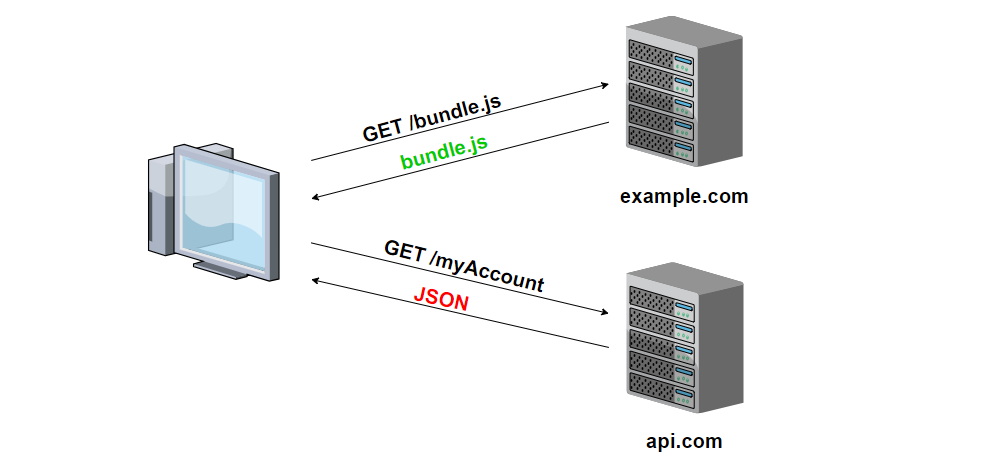
Cross-Origin Resource Sharing (CORS) is a security feature implemented by web browsers that blocks web pages from making requests to a different domain than the one that served the web page. This is done to prevent malicious websites from making unauthorized requests on behalf of the user.
CORS works by adding HTTP headers to server responses, which specify which domains are allowed to make requests to the server. When a web page tries to make a request to a different domain, the browser checks if the server response includes these headers and, if it does, allows the request to proceed. If the headers are not present, the browser blocks the request.
CORS is useful for protecting against cross-site request forgery (CSRF) attacks, which occur when a malicious website tricks the user’s browser into making requests to another website on the user’s behalf. CORS helps to prevent this by requiring the server to explicitly authorize requests from other domains.
There are several HTTP headers that can be used to specify which domains are allowed to make requests to the server. The most commonly used headers are:
- Access-Control-Allow-Origin: This header specifies which domains are allowed to make requests to the server. The value of this header can be a specific domain (e.g. https://example.com) or the wildcard *, which allows any domain to make requests to the server.
- Access-Control-Allow-Methods: This header specifies which HTTP methods are allowed in CORS requests. For example, if this header is set to GET, POST, it will allow CORS requests using the GET and POST methods.
- Access-Control-Allow-Headers: This header specifies which HTTP headers are allowed in CORS requests. For example, if this header is set to Content-Type, it will allow CORS requests that include a Content-Type header.
- Access-Control-Allow-Credentials: This header specifies whether CORS requests are allowed to include user credentials (e.g. cookies). If this header is set to true, CORS requests will be allowed to include user credentials.
CORS can be enabled on the server side by adding the appropriate HTTP headers to server responses. There are also libraries and frameworks available for various programming languages that can simplify the process of implementing CORS on the server.
In summary, CORS is a security feature that blocks web pages from making requests to a different domain than the one that served the web page. It helps to protect against CSRF attacks and is implemented by adding HTTP headers to server responses that specify which domains are allowed to make requests to the server.
Here is an example of how you can add CORS to a Node-Express Restful service:
const express = require('express');
const cors = require('cors');

const app = express();

// Enable CORS for all routes
app.use(cors());

// Your routes go here

app.listen(3000, () => {
  console.log('Server listening on port 3000');
});
This example uses the cors middleware package to enable CORS for all routes in the Express app. The cors middleware automatically adds the appropriate HTTP headers to the server responses to allow CORS requests from any domain.
You can install cors package using this command:
npm install --save corsYou can also configure the cors middleware to allow CORS requests only from specific domains by passing an options object to the cors() function:
app.use(cors({
  origin: 'https://example.com'
}));
This example allows CORS requests only from the https://example.com domain.
You can also specify an array of allowed domains:
app.use(cors({
  origin: ['https://example.com', 'https://other-site.com']
}));
This example allows CORS requests from the https://example.com and https://other-site.com domains.