Understanding Kafka Partitions and Consumer Groups: A Practical Deep Dive
When engineers first start learning Apache Kafka, two concepts often create confusion:
- Partitions
- Consumer Groups
Questions like these are extremely common:
- Why does Kafka need partitions?
- Are partitions tied to brokers?
- Why would a consumer group contain multiple consumers if only one consumer processes a message?
- Should the number of partitions equal the number of consumers?
This article explains these concepts from a practical, architectural perspective.
What Is a Kafka Topic?
A Kafka topic is a logical stream of messages.
Example:
orders
payments
shipments
notifications
Applications publish messages into topics, and other applications consume them.
However, Kafka topics are not stored as a single monolithic structure.
They are divided into partitions.
What Is a Partition?
A partition is an append-only ordered log inside a topic.
Example:
Topic: orders

Partitions:
orders-0
orders-1
orders-2
orders-3
Each partition stores a subset of the topic’s messages.
Why Kafka Uses Partitions
Partitions are fundamental to Kafka’s scalability and performance model.
They provide:
- Horizontal scalability
- Parallel processing
- Ordering guarantees
- Fault tolerance
Let’s understand each.
1. Scalability
Imagine an ecommerce platform processing:
100,000 orders per secondStoring all messages in one file on one server would become a bottleneck.
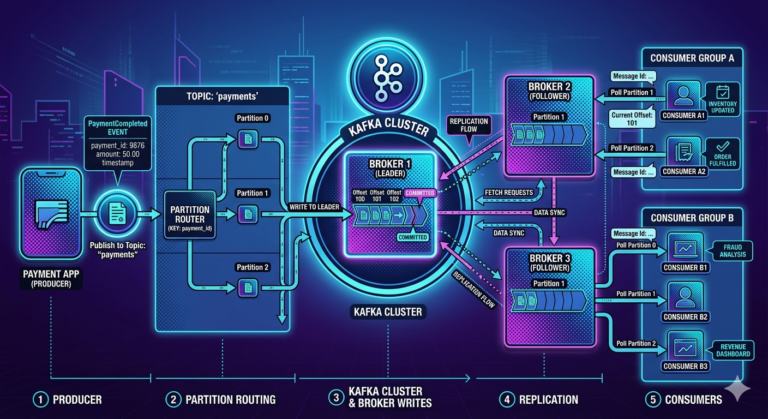
Kafka solves this by distributing partitions across multiple brokers.
Example:
Broker 1 -> orders-0
Broker 2 -> orders-1
Broker 3 -> orders-2
This allows Kafka to scale horizontally.
More brokers can host more partitions.
2. Parallel Processing
Partitions enable parallel consumption.
Example:
Topic: orders
Partitions: 4
Kafka can assign different partitions to different consumers:
Consumer A -> Partition 0
Consumer B -> Partition 1
Consumer C -> Partition 2
Consumer D -> Partition 3
Now message processing happens concurrently.
Without partitions, Kafka would process everything sequentially.
3. Ordering Guarantees
Kafka guarantees ordering only within a partition.
Example:
Partition 0

OrderCreated
OrderPaid
OrderShipped
OrderDelivered
Consumers will receive these in exact order.
However, Kafka does NOT guarantee ordering across partitions.
This is why related events are usually routed to the same partition using a message key.
4. Fault Tolerance
Partitions are replicated.
Example:
orders-0
Leader: Broker 1
Replica: Broker 2
Replica: Broker 3
If Broker 1 fails:
- another replica becomes leader
- processing continues
Partitions are therefore the unit of:
- replication
- leader election
- recovery
Are Partitions Equal to Number of Brokers?
No.
This is one of the biggest misconceptions in Kafka.
Partitions and brokers are independent concepts.
Broker vs Partition
Broker
A broker is a Kafka server/node.
Example:
Broker 1
Broker 2
Broker 3
Partition
A partition is a logical shard of topic data.
Example:
orders-0
orders-1
orders-2
orders-3
orders-4
orders-5
Kafka distributes partitions across brokers.
Real-World Example
3 Brokers and 12 Partitions
Broker 1:
P0 P3 P6 P9

Broker 2:
P1 P4 P7 P10

Broker 3:
P2 P5 P8 P11
This is completely normal.
Production systems often have:
- fewer brokers
- many more partitions
How Kafka Decides Which Partition Receives a Message
The producer usually decides the partition.
The broker generally does not.
Partitioning Strategies
1. Explicit Partition
Producer directly specifies the partition.
Example:
new ProducerRecord<>("orders", 2, key, value);Message always goes to partition 2.
2. Key-Based Partitioning (Most Common)
Producer sends a key:
customerId = C101Kafka computes:
hash(key) % number_of_partitionsExample:
hash(C101) % 4 = partition 2Now all events for customer C101 go to partition 2.
This preserves ordering for that customer.
3. No Key Provided
If no key exists, Kafka uses default partitioning strategies such as sticky partitioning.
This improves:
- batching
- throughput
- compression efficiency
What Is a Consumer Group?
A consumer group represents one logical application.
This is a critical concept.
Example:
inventory-service-group
analytics-group
fraud-detection-group
Why Multiple Consumers Exist in a Consumer Group
Suppose one application cannot process incoming traffic fast enough.
Example:
Incoming traffic:
50,000 messages/sec

Single consumer capacity:
5,000 messages/sec
A single consumer becomes a bottleneck.
Kafka solves this using multiple consumers inside the same group.
Example
Consumer Group: order-processors

Consumer A
Consumer B
Consumer C
Partitions:
P0
P1
P2
Kafka assigns:
Consumer A -> P0
Consumer B -> P1
Consumer C -> P2
Now processing happens in parallel.
Why Only One Consumer per Partition?
Kafka guarantees ordering within partitions.
Allowing multiple consumers to process the same partition simultaneously would:
- break ordering
- complicate offset management
- create race conditions
Therefore:
One partition can be actively consumed by only one consumer within a consumer group.
Are Consumers in a Group the Same Application?
Usually yes.
Example:
Order Processing Service

Instance 1
Instance 2
Instance 3
Instance 4
These are multiple instances of the same application.
They:
- run identical code
- belong to the same consumer group
- share workload
This is horizontal scaling.
Different Applications Should Use Different Consumer Groups
Suppose these applications all need order events:
- Inventory Service
- Fraud Detection Service
- Analytics Service
- Shipping Service
Each should have its own consumer group.
Example:
inventory-group
fraud-group
analytics-group
shipping-group
This ensures every application receives all messages independently.
Relationship Between Partitions and Consumers
A very important Kafka rule:
Maximum active consumers in a group
=
Number of partitions
Scenario 1: Consumers Less Than Partitions
Example:
Partitions = 6
Consumers = 3
Assignment:
Consumer A -> P0 P1
Consumer B -> P2 P3
Consumer C -> P4 P5
Completely normal.
Scenario 2: Consumers Equal Partitions
Example:
Partitions = 6
Consumers = 6
Each consumer gets one partition.
This gives maximum parallelism.
Scenario 3: Consumers Greater Than Partitions
Example:
Partitions = 3
Consumers = 5
Result:
3 active consumers
2 idle consumers
Because partitions determine maximum concurrency.
Should Partitions Equal Consumers?
No.
A better design principle is:
Partitions >= maximum expected consumer parallelismNot:
Partitions == consumersWhy Teams Often Create More Partitions Than Current Consumers
Future scalability.
Example:
Today:
Consumers = 3
But future scaling may require:
Consumers = 12If the topic only has 3 partitions:
- scaling beyond 3 active consumers becomes impossible
So teams provision extra partitions upfront.
Why Increasing Partitions Later Is Risky
For keyed messages:
hash(key) % partitionsChanging partition count changes key routing.
Example:
hash(customerId) % 4becomes:
hash(customerId) % 8Now the same customer’s events may land in different partitions.
This can affect:
- ordering guarantees
- stateful processing
- stream joins
- aggregations
Practical Kafka Sizing Guidelines
A common strategy:
Partitions =
max(
  throughput requirements,
  expected consumer parallelism
)
Then add growth headroom.
Final Mental Model
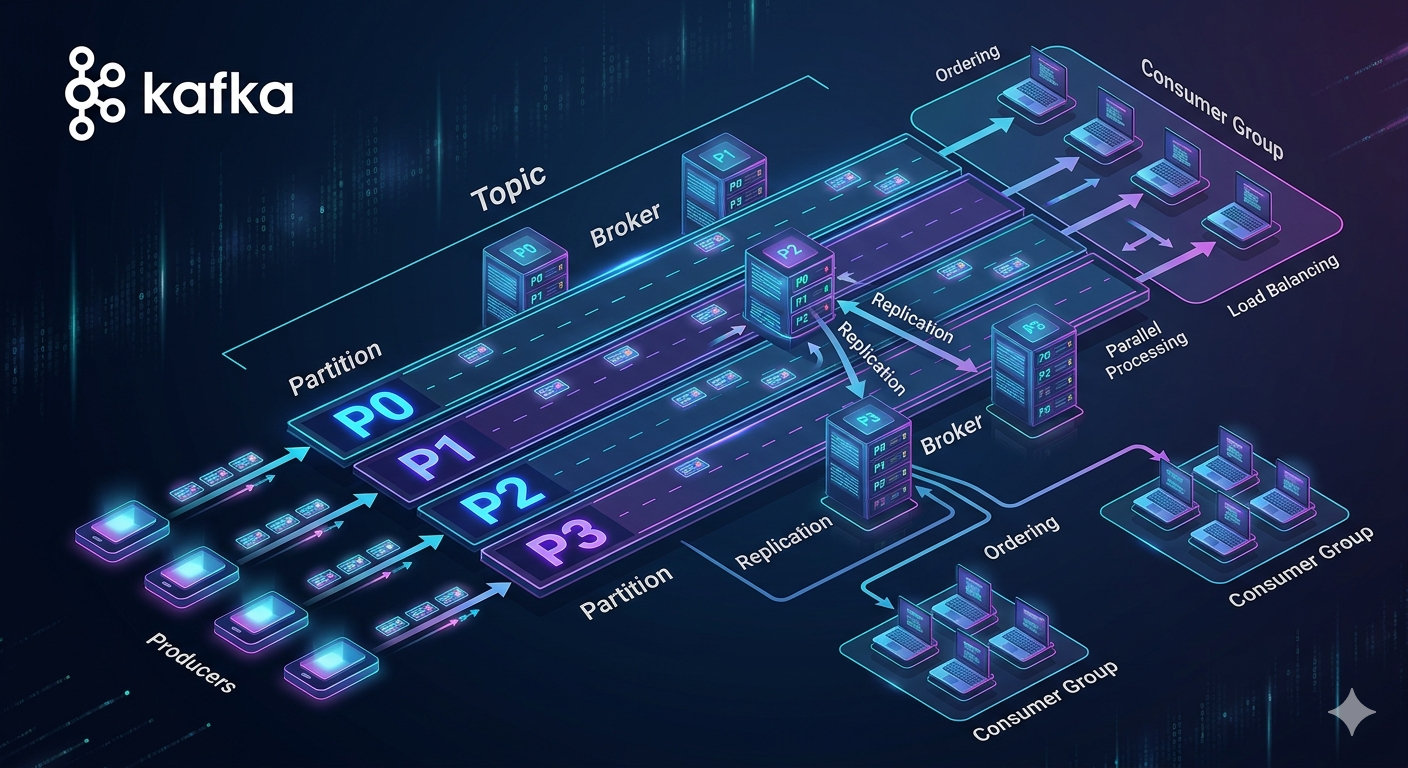
Think of Kafka like this:
Topic      = Highway
Partitions = Lanes
Consumers = Cars- More lanes enable more parallel traffic
- One lane can only be actively occupied by one consumer in a group
- One consumer can handle multiple lanes
- Extra consumers without lanes stay idle
Partitions define concurrency limits.
Key Takeaways
Partitions
- Enable scalability and parallelism
- Preserve ordering within a partition
- Are distributed across brokers
- Are not equal to brokers
Consumer Groups
- Represent one logical application
- Allow workload sharing
- Scale horizontally using multiple instances
Scaling Rule
Maximum active consumers in a group
=
Number of partitions
Best Practice
Design partition count based on:
- throughput
- future scaling
- consumer parallelism
- ordering requirements
Not broker count.