Understanding Consumer Lag in Kafka
One of the Most Important Metrics in Event-Driven Systems
One of the first operational problems teams encounter while running:
Apache Kafka
in production is:
Consumer Lag.
At first glance, consumer lag may sound like:
- a minor delay
- a harmless metric
- a temporary slowdown
But in real-world Kafka systems:
- lag can impact fraud detection
- delay payment processing
- break real-time dashboards
- slow notifications
- overload downstream systems
Consumer lag is one of the most critical operational indicators in Kafka architectures.
Understanding lag is essential for:
- operating Kafka clusters
- troubleshooting streaming systems
- scaling consumers
- building resilient real-time pipelines
In this article, we will deeply explore:
- what consumer lag is
- why lag happens
- how Kafka tracks offsets
- lag measurement
- operational impact
- scaling strategies
- lag troubleshooting
- monitoring techniques
- real-world examples
This article introduces one of the most important operational concepts in Kafka systems.
What is Consumer Lag?
Consumer lag means:
The difference between produced messages and consumed messages.
In simple terms:
How far behind a consumer is
compared to the latest records in Kafka.
Basic Example
Suppose Kafka topic contains:
Latest Offset = 10000
Consumer has processed only:
Offset = 9500
Then:
Consumer Lag = 500
Meaning:
- 500 messages still waiting to be processed.
Why Kafka Uses Offsets
Kafka stores records sequentially:
Offset 0
Offset 1
Offset 2
Offset 3
Offsets act like:
Position markers in the event log.
Consumers track:
- which offset they already processed
Lag becomes easy to calculate.
Why Consumer Lag Matters
Lag directly affects:
- real-time processing
- system responsiveness
- operational reliability
High lag means:
- consumers cannot keep up with producers.
Real-World Example — Fraud Detection
Suppose payment system produces:
50,000 transactions/sec
Fraud detection consumer processes slowly.
Lag grows continuously.
Result:
- fraud alerts become delayed
- suspicious transactions processed too late
This can become extremely dangerous in financial systems.
Real-Time Systems Depend on Low Lag
Kafka often powers:
- fraud detection
- observability dashboards
- live analytics
- notifications
- recommendation systems
These systems require:
Near real-time consumption.
High lag breaks real-time guarantees.
Understanding Kafka Consumption Flow
Producer flow:
Producer
   ↓
Kafka Topic
Consumer flow:
Consumer polls records
   ↓
Processes events
   ↓
Commits offsets
If production speed exceeds processing speed:
- lag increases.
Consumer Lag Is Not Always Bad
Small lag is:
- completely normal
Kafka systems continuously process:
- streaming workloads
Tiny temporary lag spikes happen naturally.
Problem begins when:
- lag grows continuously
- consumers never catch up
Types of Consumer Lag
Consumer lag can be:
- temporary
- burst-based
- persistent
- catastrophic
Understanding the difference is important operationally.
Temporary Lag
Example:
Traffic spike occurs
Consumers briefly fall behind.
After spike:
- consumers recover
- lag returns to normal
Usually acceptable.
Persistent Lag
Example:
Consumers permanently slower than producers
Lag continuously increases.
This indicates:
- scalability bottleneck
- processing limitation
Catastrophic Lag
Example:
Consumer stopped entirely
Lag grows uncontrollably.
Potential consequences:
- delayed processing
- storage pressure
- stale analytics
Why Consumer Lag Happens
Many causes can create lag.
1. Slow Consumer Processing
Most common cause.
Example:
- heavy database writes
- expensive business logic
- external API calls
Consumer becomes bottleneck.
Example
Producer → 1000 msgs/sec
Consumer → 400 msgs/sec
Lag grows continuously.
2. Too Few Consumers
Suppose topic has:
20 partitions
But only:
2 consumers
Consumers may become overloaded.
Scaling consumers often helps.
3. Too Few Partitions
Kafka parallelism depends on:
Partition count.
Example:
2 partitions
10 consumers
Only:
- 2 consumers active
Remaining consumers idle.
Partition planning becomes critical.
4. Downstream Bottlenecks
Consumers often depend on:
- databases
- APIs
- external services
Slow downstream systems create:
- processing delays
- lag buildup
5. Consumer Crashes
If consumer crashes:
- processing stops entirely
Lag accumulates rapidly until:
- rebalance occurs
- recovery happens
6. Rebalancing Events
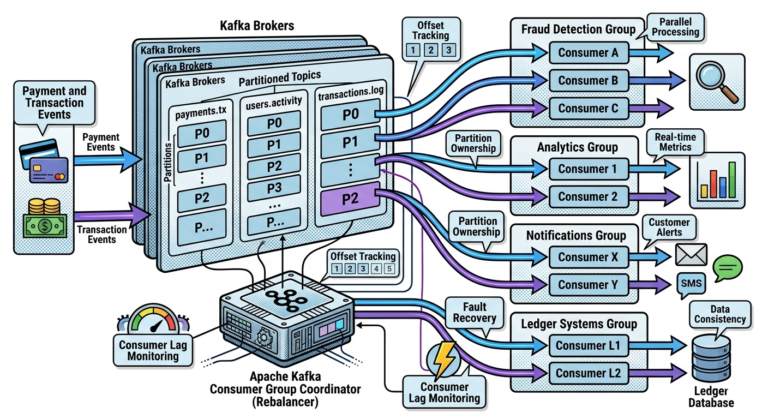
Kafka consumer groups periodically rebalance.
During rebalance:
- consumption pauses temporarily
Frequent rebalances can:
- increase lag significantly
7. Network Problems
Network latency may slow:
- broker communication
- fetch requests
- offset commits
Result:
- slower consumption
8. Large Message Sizes
Very large events increase:
- deserialization cost
- transfer latency
- memory pressure
Consumers process fewer records per second.
How Kafka Measures Lag
Kafka compares:
Latest Partition Offset
minus
Committed Consumer Offset
This produces:
Current lag.
Partition-Level Lag
Lag exists:
- per partition
Example:
Partition 0 → Lag 50
Partition 1 → Lag 5000
Partition 2 → Lag 10
Uneven lag often indicates:
- partition skew
- hot keys
- workload imbalance
Lag Monitoring Is Critical
Kafka teams continuously monitor:
- lag trends
- lag spikes
- consumer throughput
- partition imbalance
Lag often becomes:
Earliest warning signal in Kafka systems.
Consumer Lag and Business Impact
Lag directly affects business systems.
Examples:
| System | Lag Impact |
|---|---|
| Fraud Detection | Delayed alerts |
| Notifications | Slow customer updates |
| Analytics | Stale dashboards |
| Observability | Delayed incident detection |
| Inventory Systems | Incorrect stock visibility |
Real-Time Dashboards and Lag
Suppose analytics dashboard shows:
- sales metrics
If lag becomes:
200,000 messages
dashboard may show:
- data several minutes old
Operational visibility becomes inaccurate.
Lag and Retention Risk
Extreme lag creates another danger:
Consumer falls behind retention window
Kafka eventually deletes older records.
Consumer may permanently lose:
- historical messages
This is extremely serious.
Example Retention Problem
Topic retention:
7 days
Consumer offline for:
10 days
Old records already deleted.
Replay becomes impossible.
Scaling Consumers to Reduce Lag
One common solution:
Add more consumers
Kafka distributes partitions across consumers.
This improves:
- parallel processing
- throughput
Important Limitation
Maximum parallelism equals:
Number of partitions.
Example:
4 partitions
10 consumers
Only:
- 4 consumers active
Partition count determines scaling ceiling.
Optimizing Consumer Logic
Sometimes scaling consumers is insufficient.
Optimization areas include:
- batching database writes
- reducing API calls
- asynchronous processing
- improving deserialization efficiency
Backpressure Handling
High lag often indicates:
Backpressure.
Meaning:
- downstream systems cannot keep up
Good architectures must handle:
- traffic spikes
- overload scenarios
gracefully.
Consumer Lag Monitoring Tools
Popular tools include:
| Tool | Purpose |
|---|---|
| Grafana | Dashboards |
| Prometheus | Metrics collection |
| Kafka UI | Consumer visualization |
| AKHQ | Topic and lag monitoring |
Grafana Dashboards
Grafana
visualizes:
- lag trends
- throughput
- partition health
- consumer performance
Prometheus Metrics
Prometheus
collects:
- Kafka metrics
- lag measurements
- consumer statistics
Alerting on Lag
Teams often configure alerts like:
Lag > 50,000
or:
Lag increasing continuously for 10 minutes
Early alerts help prevent outages.
Real-World Example — Payment Pipeline
Suppose payment system produces:
- massive transaction spikes during sales events
Consumers may temporarily lag.
Monitoring helps teams:
- scale consumers
- increase partitions
- add brokers
before systems fail.
Lag in Stream Processing Systems
Kafka Streams applications also experience:
- processing lag
Stateful processing may increase:
- computation cost
- memory usage
- processing latency
Observability becomes critical.
Lag and Ordering Tradeoffs
Increasing parallelism may reduce lag but can complicate:
- ordering guarantees
- partition strategies
Kafka architecture always balances:
- scalability
- ordering
- throughput
Why Lag Is One of Kafka’s Most Important Metrics
Consumer lag directly reflects:
- streaming system health
- scalability efficiency
- operational responsiveness
It acts as:
A heartbeat for event-driven systems.
Common Beginner Misconceptions
Misconception 1
Any lag means failure
Small temporary lag is normal.
Misconception 2
More consumers always solve lag
Parallelism limited by partitions.
Misconception 3
Lag only affects analytics
Lag affects:
- fraud detection
- payments
- notifications
- operational systems
Misconception 4
Kafka automatically fixes lag
Applications and infrastructure still require tuning.
Why Consumer Lag Matters So Much
Modern event-driven systems increasingly depend on:
- real-time processing
- low-latency workflows
- continuous event streaming
Consumer lag directly impacts:
- system responsiveness
- operational reliability
- business outcomes
This is why:
Apache Kafka
operators closely monitor lag in every production environment.
Key Takeaways
Consumer lag measures:
- how far consumers are behind producers
Lag is calculated using:
- Kafka offsets
High lag may indicate:
- slow processing
- insufficient scaling
- downstream bottlenecks
- partition imbalance
Consumer lag directly impacts:
- real-time analytics
- fraud detection
- dashboards
- operational workflows
Important lag management strategies include:
- scaling consumers
- increasing partitions
- optimizing processing logic
- monitoring continuously
Observability tools like:
- Grafana
- Prometheus
- Kafka UI
help teams monitor and troubleshoot lag effectively in:
Apache Kafka
production systems.