Understanding Kafka Partitioning Through Practical Experiments
Exploring Scalability, Ordering, and Parallel Processing in Kafka
One of the most important architectural concepts in:
Apache Kafka
is:
Partitioning.
Kafka partitions are the foundation of:
- scalability
- parallelism
- throughput
- distributed processing
- consumer scaling
Without partitions:
- Kafka would behave like a traditional queue
- throughput would be limited
- horizontal scaling would become difficult
But partitioning also introduces:
- ordering boundaries
- consumer coordination
- load distribution challenges
In this article, we will explore Kafka partitioning through practical hands-on experiments.
We will demonstrate:
- how partitions work
- how records are distributed
- how ordering behaves
- how consumers scale
- how keys affect partitioning
- how partition counts influence architecture
By the end, you will develop an intuitive operational understanding of Kafka partitioning.
Why Partitioning Exists
Imagine a payment platform processing:
1 million payment events per second
If Kafka used:
- one partition
- one consumer
- one broker
the system would quickly become overwhelmed.
Kafka solves this by dividing topics into:
Partitions.
What is a Partition?
A partition is:
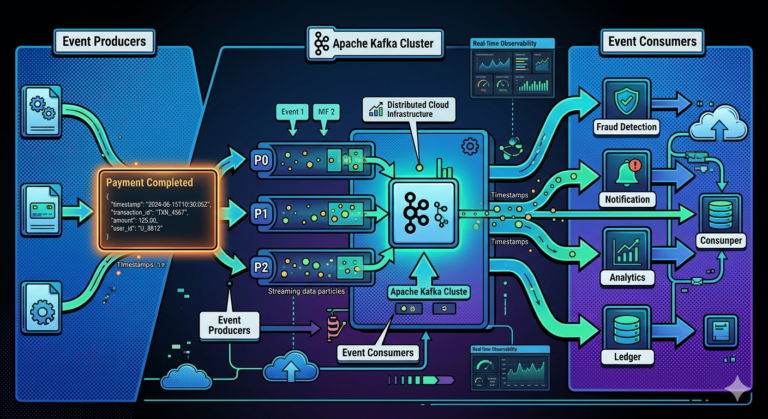
An ordered append-only log segment within a topic.
Example:
payments topic
 ├── Partition 0
 ├── Partition 1
 ├── Partition 2
Each partition stores:
- its own messages
- its own offsets
- its own ordering sequence
Why Partitions Matter
Partitions enable:
- horizontal scalability
- parallel processing
- distributed storage
- consumer scaling
They are one of Kafka’s most important architectural innovations.
What We Will Explore
We will perform experiments covering:
- single partition ordering
- multi-partition distribution
- consumer parallelism
- keyed messages
- consumer groups
- partition imbalance
- scaling behavior
Prerequisites
You should already have:
- Kafka running locally
- Docker setup working
If not, complete:
- local Kafka setup
- producer/consumer CLI exercises
from previous tutorials.
Step 1 — Create a Single Partition Topic
Let us first create a topic with:
One partition.
Run:
kafka-topics.sh \
  --create \
  --topic payments \
  --partitions 1 \
  --bootstrap-server localhost:9092
Why Start with One Partition?
A single partition helps demonstrate:
- strict ordering
- sequential offsets
- append-only logs
This creates the simplest possible Kafka stream.
Describe the Topic
Run:
kafka-topics.sh \
  --describe \
  --topic payments \
  --bootstrap-server localhost:9092
Expected:
PartitionCount: 1
Step 2 — Produce Messages
Start producer:
kafka-console-producer.sh \
  --topic payments \
  --bootstrap-server localhost:9092
Now enter:
PaymentInitiated
PaymentCompleted
ReceiptGenerated
FraudChecked
Step 3 — Consume Messages
Open another terminal and run:
kafka-console-consumer.sh \
  --topic payments \
  --from-beginning \
  --bootstrap-server localhost:9092
Expected output:
PaymentInitiated
PaymentCompleted
ReceiptGenerated
FraudChecked
Important Observation — Ordering
Notice:
- events appear exactly in publish order
Why?
Because:
Kafka guarantees ordering within a partition.
This is extremely important.
Ordering Guarantee
Inside a partition:
Offset 0 → PaymentInitiated
Offset 1 → PaymentCompleted
Offset 2 → ReceiptGenerated
Kafka preserves sequence strictly.
Why Ordering Matters
Ordering is critical for:
- financial systems
- inventory management
- event sourcing
- state machines
Incorrect ordering can corrupt business logic.
Step 4 — Create Multi-Partition Topic
Now create a topic with:
Multiple partitions.
Run:
kafka-topics.sh \
  --create \
  --topic orders \
  --partitions 3 \
  --bootstrap-server localhost:9092
Describe the Topic
Run:
kafka-topics.sh \
  --describe \
  --topic orders \
  --bootstrap-server localhost:9092
Expected:
PartitionCount: 3
Now Kafka can distribute records across partitions.
Step 5 — Produce Messages Without Keys
Run producer:
kafka-console-producer.sh \
  --topic orders \
  --bootstrap-server localhost:9092
Enter messages:
Order1
Order2
Order3
Order4
Order5
Order6
What Happens Internally?
Since no key is provided:
- Kafka distributes messages across partitions
Usually using:
Round-robin partitioning.
This balances load.
Why Round Robin Exists
Round-robin distribution:
- spreads traffic evenly
- maximizes throughput
- avoids hotspots
Excellent for:
- independent events
- analytics streams
- telemetry pipelines
Step 6 — Observe Partition Assignment
Consume with metadata:
kafka-console-consumer.sh \
  --topic orders \
  --from-beginning \
  --property print.partition=true \
  --bootstrap-server localhost:9092
Expected output:
Partition:0 Order1
Partition:1 Order2
Partition:2 Order3
Observe:
- messages distributed across partitions
Important Observation — Ordering Changes
Now ordering becomes:
Guaranteed only within each partition
NOT across the entire topic.
This is one of Kafka’s most important architectural rules.
Global Ordering Does Not Exist
Suppose:
Partition 0 → Order1
Partition 1 → Order2
Partition 2 → Order3
Consumers processing in parallel may observe:
- varying interleaving
Kafka guarantees:
- partition ordering
not: - topic-wide ordering
Why Kafka Accepts This Tradeoff
Because:
Scalability requires partition parallelism.
Strict global ordering would:
- severely limit throughput
- reduce scalability
Kafka prioritizes:
- distributed scalability
Step 7 — Key-Based Partitioning
Now let us preserve ordering for specific entities.
Run producer with keys:
kafka-console-producer.sh \
  --topic orders \
  --property parse.key=true \
  --property key.separator=: \
  --bootstrap-server localhost:9092
Enter:
CUST100:OrderPlaced
CUST100:PaymentCompleted
CUST100:ShipmentCreated
What Happened?
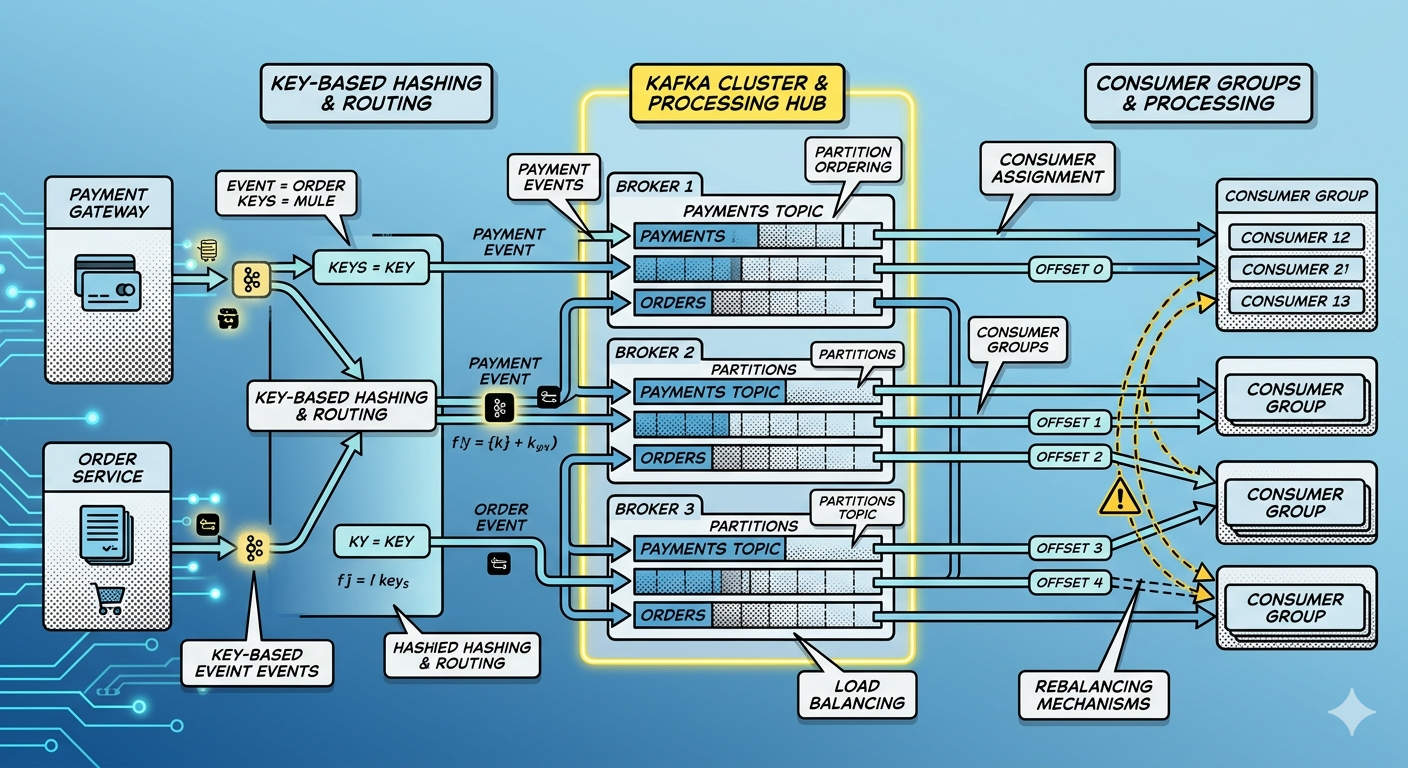
Kafka hashes:
CUST100
All related events go to:
- same partition
This preserves ordering for that customer.
Why Key-Based Partitioning Matters
Key-based partitioning enables:
- customer consistency
- account-level ordering
- session affinity
- deterministic processing
Critical for:
- banking
- payments
- order management
Step 8 — Observe Keyed Partition Assignment
Consume with partition display:
kafka-console-consumer.sh \
  --topic orders \
  --from-beginning \
  --property print.partition=true \
  --bootstrap-server localhost:9092
You will likely observe:
Partition:1 OrderPlaced
Partition:1 PaymentCompleted
Partition:1 ShipmentCreated
Same customer → same partition.
Understanding Kafka Hashing
Kafka typically computes:
hash(key) % partitionCount
This determines partition placement.
Stable keys create deterministic routing.
Step 9 — Consumer Parallelism Experiment
Now let us explore scalability.
Create topic:
kafka-topics.sh \
  --create \
  --topic transactions \
  --partitions 3 \
  --bootstrap-server localhost:9092
Start Multiple Consumers
Terminal 1:
kafka-console-consumer.sh \
  --topic transactions \
  --group transaction-group \
  --bootstrap-server localhost:9092
Terminal 2:
kafka-console-consumer.sh \
  --topic transactions \
  --group transaction-group \
  --bootstrap-server localhost:9092
Terminal 3:
kafka-console-consumer.sh \
  --topic transactions \
  --group transaction-group \
  --bootstrap-server localhost:9092
What Happens?
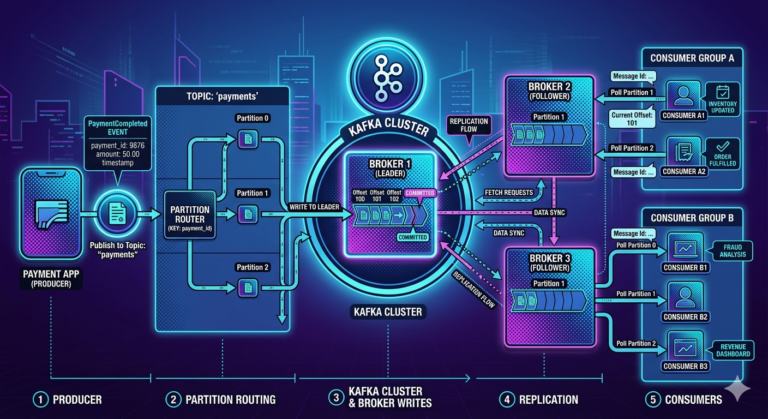
Kafka distributes partitions across consumers.
Example:
Consumer 1 → Partition 0
Consumer 2 → Partition 1
Consumer 3 → Partition 2
This enables:
Parallel consumption.
Why Consumer Groups Matter
Consumer groups enable:
- horizontal scaling
- distributed workload balancing
- fault tolerance
Without partitions:
- scaling consumers becomes impossible
Important Rule
Within a consumer group:
One partition can be consumed by only one consumer at a time.
This preserves ordering.
Step 10 — More Consumers Than Partitions
Now start:
- 5 consumers
- only 3 partitions
Observation:
- 2 consumers remain idle
Why?
Because:
- partitions determine maximum parallelism
Critical Kafka Scaling Insight
Maximum consumer parallelism equals:
Number of partitions
This is one of Kafka’s most important operational concepts.
Partition Count is a Strategic Decision
Too few partitions:
- limited scalability
Too many partitions:
- higher overhead
- rebalance complexity
- metadata load
Partition planning is critical in production systems.
Step 11 — Observe Consumer Rebalancing
Stop one consumer.
Kafka automatically redistributes partitions:
Consumer leaves group
   ↓
Partitions reassigned
This process is called:
Rebalancing.
Why Rebalancing Exists
Kafka must ensure:
- every partition has an active consumer
Rebalancing maintains:
- workload distribution
- fault tolerance
Why Rebalancing Can Be Expensive
Large consumer groups may experience:
- temporary pauses
- reassignment overhead
- state movement costs
This becomes important at enterprise scale.
Partition Hotspots
Bad key selection can create:
Hot partitions.
Example:
All traffic uses same customer ID
Result:
- one partition overloaded
- uneven scaling
- poor throughput
Good partition keys are extremely important.
Real-World Example — Payment Systems
Payment platforms often partition by:
- customer ID
- account ID
- transaction group
This preserves:
- ordering consistency
- financial correctness
while still enabling scalability.
Kafka Partitioning Tradeoffs
Kafka partitioning balances:
- scalability
- ordering
- throughput
- complexity
You cannot maximize all perfectly simultaneously.
Architectural tradeoffs always exist.
Common Beginner Misconceptions
Misconception 1
Kafka guarantees global ordering
Ordering exists only within partitions.
Misconception 2
More consumers always improve throughput
Only if enough partitions exist.
Misconception 3
Partitions are just storage containers
Partitions define:
- scalability
- ordering
- parallelism
Misconception 4
Keys are optional in critical systems
Keys are often essential for ordering guarantees.
Why Partitioning is the Heart of Kafka
Partitioning enables Kafka to become:
- massively scalable
- highly parallel
- fault tolerant
- distributed
Without partitioning:
Apache Kafka
would not achieve its extraordinary throughput and scalability characteristics.
Key Takeaways
Kafka partitions:
- divide topics into scalable ordered logs
Partitions enable:
- horizontal scalability
- distributed storage
- consumer parallelism
Kafka guarantees:
- ordering only within partitions
Key-based partitioning preserves:
- entity-level ordering
- deterministic routing
Consumer groups use partitions to:
- distribute workload
- scale processing
- balance consumers
Understanding partitioning is absolutely essential for designing scalable Kafka-based event-driven systems.