Your First Kafka Producer and Consumer Using CLI
Understanding Kafka Message Flow Through Hands-On Command Line Experiments
One of the best ways to truly understand:
Apache Kafka
is to interact with it directly.
Before building:
- microservices
- Kafka Streams applications
- Spring Boot integrations
- fraud detection pipelines
- event-driven architectures
you should first understand:
How Kafka behaves at the lowest level.
And the best tool for that is:
Kafka CLI utilities.
Kafka’s command-line tools allow you to:
- create topics
- publish events
- consume events
- inspect partitions
- observe ordering
- understand offsets
- experiment with message flow
In this article, we will perform practical Kafka experiments using:
- Kafka Console Producer
- Kafka Console Consumer
- topic commands
- partition experiments
- ordering demonstrations
This article builds the bridge between Kafka theory and real operational understanding.
Why Learn Kafka Through CLI First?
Many developers immediately jump into:
- Java clients
- Spring Kafka
- frameworks
- abstractions
This often hides Kafka’s actual behavior.
CLI tools expose:
- raw message flow
- partition behavior
- offsets
- ordering
- consumer mechanics
This creates much stronger conceptual clarity.
What We Will Build
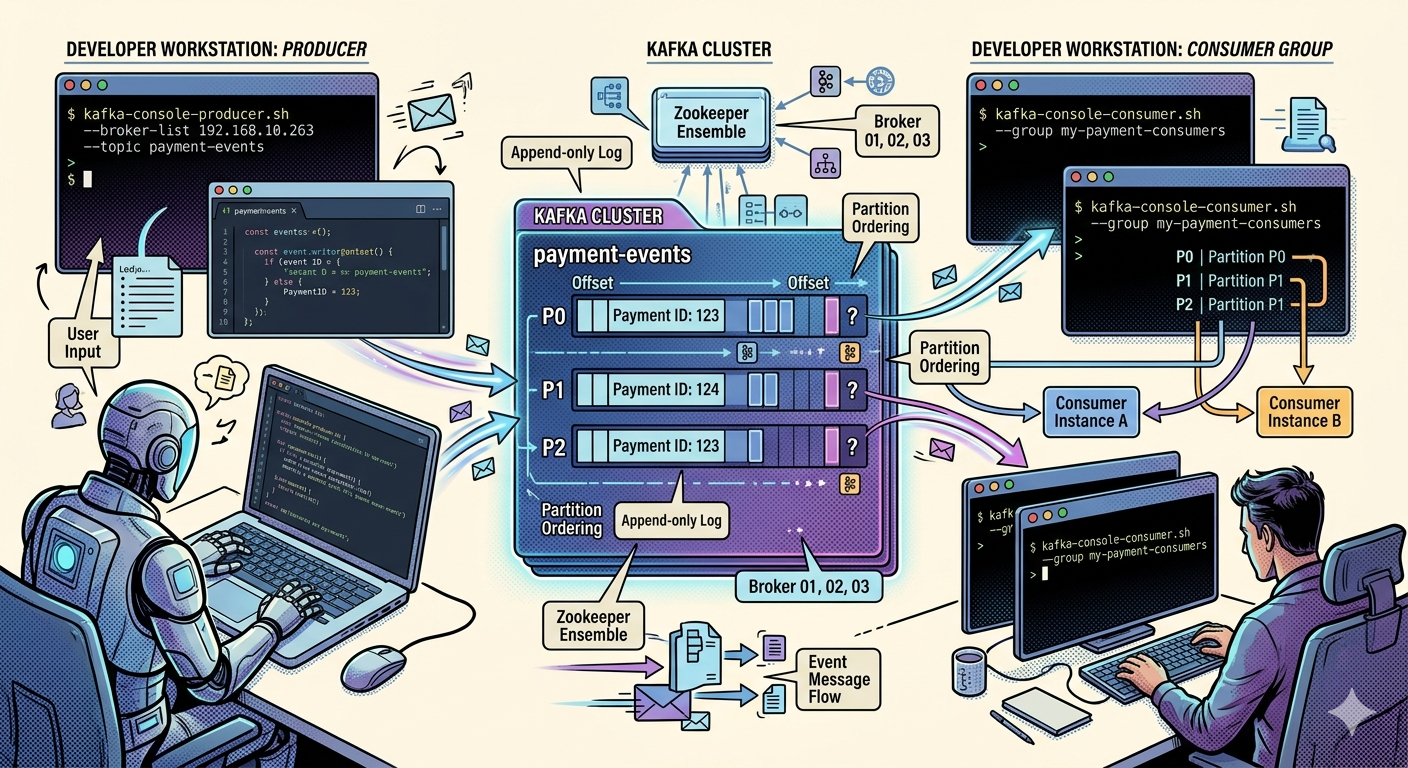
We will create a simple local Kafka workflow:
Producer CLI
     ↓
Kafka Topic
     ↓
Consumer CLI
We will observe:
- event publishing
- event storage
- event consumption
- ordering behavior
in real time.
Prerequisites
Before starting:
- Docker installed
- Kafka running locally
If Kafka is not already running, refer to the previous article on:
Setting Up Apache Kafka Locally Using Docker
Verify Kafka is Running
Run:
docker ps
Expected:
kafka
Kafka container should be active.
Enter the Kafka Container
Run:
docker exec -it kafka bash
You are now inside the Kafka container shell.
All Kafka CLI commands will run here.
Understanding Kafka CLI Utilities
Kafka ships with several powerful tools.
Important ones include:
| Tool | Purpose |
|---|---|
| kafka-topics.sh | Topic management |
| kafka-console-producer.sh | Publish events |
| kafka-console-consumer.sh | Consume events |
| kafka-consumer-groups.sh | Consumer group inspection |
These utilities are extremely valuable for learning and debugging.
Step 1 — Create a Topic
Let us create a topic named:
payments
Run:
kafka-topics.sh \
  --create \
  --topic payments \
  --bootstrap-server localhost:9092
What Happened Internally?
Kafka:
- registered topic metadata
- allocated partitions
- assigned leaders
- initialized storage logs
Even this simple command triggers significant internal coordination.
Verify Topic Creation
Run:
kafka-topics.sh \
  --list \
  --bootstrap-server localhost:9092
Expected:
payments
Describe the Topic
Now inspect the topic:
kafka-topics.sh \
  --describe \
  --topic payments \
  --bootstrap-server localhost:9092
Expected output includes:
- partition count
- replication factor
- leader broker
- replica assignments
Example:
Topic: payments
PartitionCount: 1
ReplicationFactor: 1
Understanding the Output
Important fields:
PartitionCount
Determines:
- scalability
- parallelism
- ordering boundaries
ReplicationFactor
Determines:
- durability
- fault tolerance
Leader
Indicates:
- which broker handles reads/writes
Step 2 — Start a Kafka Producer
Now let us publish events.
Run:
kafka-console-producer.sh \
  --topic payments \
  --bootstrap-server localhost:9092
The terminal now waits for input.
Produce Your First Events
Type:
PaymentCompleted
PaymentRefunded
FraudDetected
Press Enter after each line.
Each line becomes:
A Kafka record.
What Happened Internally?
For every line:
- producer created Kafka message
- broker received event
- Kafka appended message to partition log
- offset assigned
You are now actively producing Kafka events.
Step 3 — Start a Consumer
Open a second terminal.
Enter container again:
docker exec -it kafka bash
Now run consumer:
kafka-console-consumer.sh \
  --topic payments \
  --from-beginning \
  --bootstrap-server localhost:9092
Expected output:
PaymentCompleted
PaymentRefunded
FraudDetected
What Happened Internally?
Consumer:
- connected to broker
- requested records from topic
- fetched events sequentially
- read from partition offsets
This demonstrates Kafka’s:
- append-only log architecture
- durable storage model
Understanding –from-beginning
This flag tells Kafka:
Read historical messages from earliest offset
Without it:
- consumer reads only new incoming events
Real-Time Streaming Experiment
Keep consumer running.
Now return to producer terminal.
Type additional events:
InventoryReserved
ShipmentCreated
DeliveryCompleted
Consumer immediately displays them.
This demonstrates:
Real-time event streaming.
Kafka Consumers Continuously Poll
Consumers do not passively receive messages.
Instead:
- they continuously poll Kafka
This pull-based model improves:
- scalability
- backpressure handling
- consumer independence
Understanding Message Ordering
Now observe the order:
PaymentCompleted
PaymentRefunded
FraudDetected
InventoryReserved
ShipmentCreated
DeliveryCompleted
Messages appear exactly in publish order.
Why?
Because:
- single partition preserves ordering
Why Ordering Matters
Ordering is critical for:
- payments
- inventory systems
- ledgers
- fraud detection
Incorrect ordering can create:
- inconsistent balances
- invalid state transitions
- duplicate workflows
Step 4 — Observe Offsets
Run:
kafka-console-consumer.sh \
  --topic payments \
  --from-beginning \
  --property print.offset=true \
  --bootstrap-server localhost:9092
Expected output:
0    PaymentCompleted
1    PaymentRefunded
2    FraudDetected
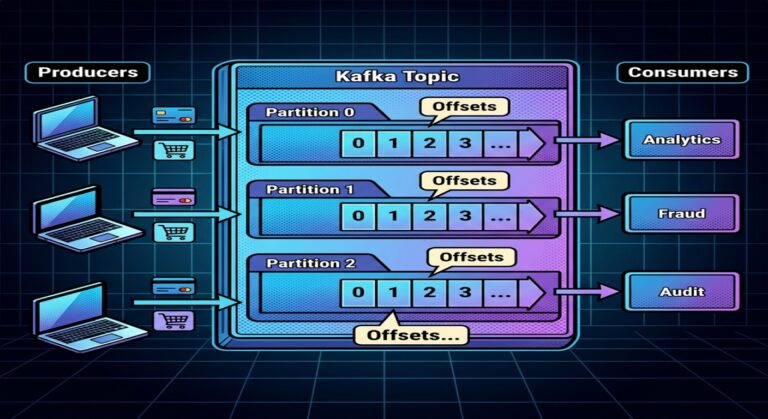
What Are Offsets?
Offsets represent:
Position of records inside a partition.
Example:
Offset 0
Offset 1
Offset 2
Offsets enable:
- replayability
- recovery
- tracking consumer progress
Kafka is an Append-Only Log
Every event is appended sequentially:
Offset 0 → PaymentCompleted
Offset 1 → PaymentRefunded
Offset 2 → FraudDetected
Kafka does not overwrite records.
This design enables:
- durability
- replay
- high throughput
Step 5 — Observe Consumer Groups
Kafka consumers operate using:
Consumer groups.
Start consumer with group:
kafka-console-consumer.sh \
  --topic payments \
  --group payment-group \
  --bootstrap-server localhost:9092
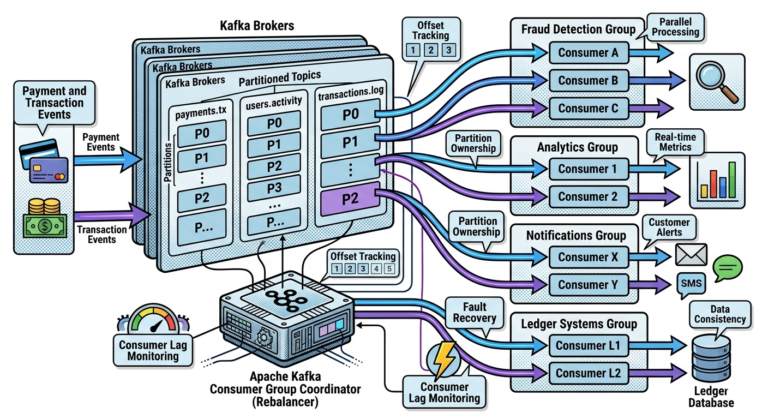
What is a Consumer Group?
A consumer group enables:
- scalable parallel processing
- coordinated partition ownership
Consumers within same group:
- share workload
Inspect Consumer Group
Run:
kafka-consumer-groups.sh \
  --describe \
  --group payment-group \
  --bootstrap-server localhost:9092
You will see:
- assigned partitions
- current offsets
- lag information
Understanding Consumer Lag
Lag means:
Messages available
minus
messages consumed
High lag may indicate:
- slow consumers
- overloaded systems
- bottlenecks
Lag monitoring is extremely important in production Kafka systems.
Step 6 — Multi-Partition Experiment
Create topic with multiple partitions:
kafka-topics.sh \
  --create \
  --topic orders \
  --partitions 3 \
  --bootstrap-server localhost:9092
Why Multiple Partitions Matter
Partitions enable:
- horizontal scalability
- parallel consumption
- distributed throughput
Without partitions:
- Kafka scaling becomes limited
Describe Multi-Partition Topic
Run:
kafka-topics.sh \
  --describe \
  --topic orders \
  --bootstrap-server localhost:9092
Observe:
- multiple partitions assigned
Important Ordering Observation
Kafka guarantees:
Ordering only within a partition.
Not across entire topic.
This is one of Kafka’s most important architectural rules.
Step 7 — Produce Keyed Messages
Run producer with keys:
kafka-console-producer.sh \
  --topic orders \
  --property parse.key=true \
  --property key.separator=: \
  --bootstrap-server localhost:9092
Now enter:
CUST100:OrderPlaced
CUST100:PaymentCompleted
CUST100:ShipmentCreated
What Happened?
Kafka hashes:
CUST100
All related events likely go to:
- same partition
This preserves ordering for that customer.
Why Key-Based Partitioning Matters
Key-based partitioning enables:
- customer-level ordering
- account-level consistency
- session affinity
- deterministic processing
Critical for:
- banking
- payments
- e-commerce
Kafka Stores Messages Persistently
Unlike traditional queues:
- Kafka retains records after consumption
Consumers can:
- replay history
- recover state
- reprocess events
This is one of Kafka’s most powerful capabilities.
Replay Experiment
Run:
kafka-console-consumer.sh \
  --topic payments \
  --from-beginning \
  --bootstrap-server localhost:9092
Even old messages reappear.
This demonstrates:
Event replay capability.
Why Replay is Valuable
Replay enables:
- debugging
- analytics rebuilding
- recovery
- event sourcing
- machine learning pipelines
Traditional queues often cannot do this easily.
Common Beginner Mistakes
Mistake 1
Assuming Kafka deletes messages after consumption
Kafka retains records.
Mistake 2
Assuming ordering exists across all partitions
Ordering exists only within partitions.
Mistake 3
Ignoring consumer groups
Consumer groups are central to Kafka scalability.
Mistake 4
Skipping CLI learning
CLI experimentation builds deep operational understanding.
Why These Experiments Matter
These simple exercises reveal:
- how Kafka stores events
- how consumers read data
- how offsets work
- how partitions behave
- how ordering is preserved
- how real-time streaming functions
This operational intuition is essential before moving into:
- Kafka programming
- stream processing
- distributed event architectures
Key Takeaways
Kafka CLI tools provide direct visibility into:
- event flow
- topics
- partitions
- offsets
- consumer behavior
Using:
- console producers
- console consumers
- topic inspection tools
helps build strong foundational understanding of:
Apache Kafka
Topics store event streams.
Partitions enable scalability.
Offsets track event positions.
Consumers poll records continuously.
And Kafka’s append-only log model enables:
- durability
- replayability
- real-time streaming
- distributed event processing