Kafka Consumer Groups Explained Simply
The Secret Behind Kafka Scalability and Parallel Processing
One of the most powerful features of:
Apache Kafka
is:
Consumer Groups.
Consumer groups are the reason Kafka can:
- process millions of events
- scale horizontally
- distribute workload efficiently
- support fault-tolerant stream processing
Without consumer groups:
- Kafka would behave like a basic messaging queue
- parallel processing would be limited
- large-scale event streaming would become difficult
Consumer groups are one of the most important concepts in Kafka architecture.
In this article, we will deeply explore:
- what consumer groups are
- why Kafka uses them
- partition assignment
- parallel processing
- consumer scaling
- rebalancing
- consumer lag
- fault tolerance
- real-world examples
- common architectural patterns
Understanding consumer groups is absolutely essential for working with Kafka in production environments.
Why Consumer Groups Exist
Imagine a payment platform generating:
5 million payment events per hour
Suppose only:
- one consumer processes all messages
Very quickly:
- processing backlog grows
- latency increases
- throughput becomes insufficient
Kafka solves this using:
Consumer groups.
What is a Consumer Group?
A consumer group is:
A set of consumers working together to process a Kafka topic.
Instead of:
- every consumer reading every message
Kafka distributes partitions among group members.
This enables:
- parallel processing
- workload sharing
- horizontal scalability
High-Level Architecture
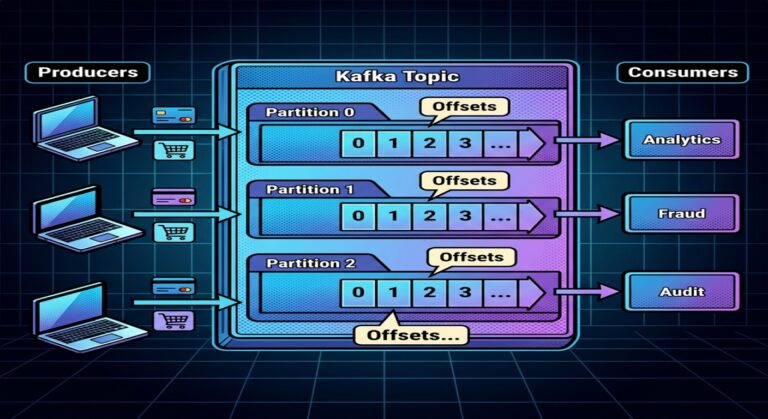
Kafka Topic
   ├── Partition 0
   ├── Partition 1
   └── Partition 2

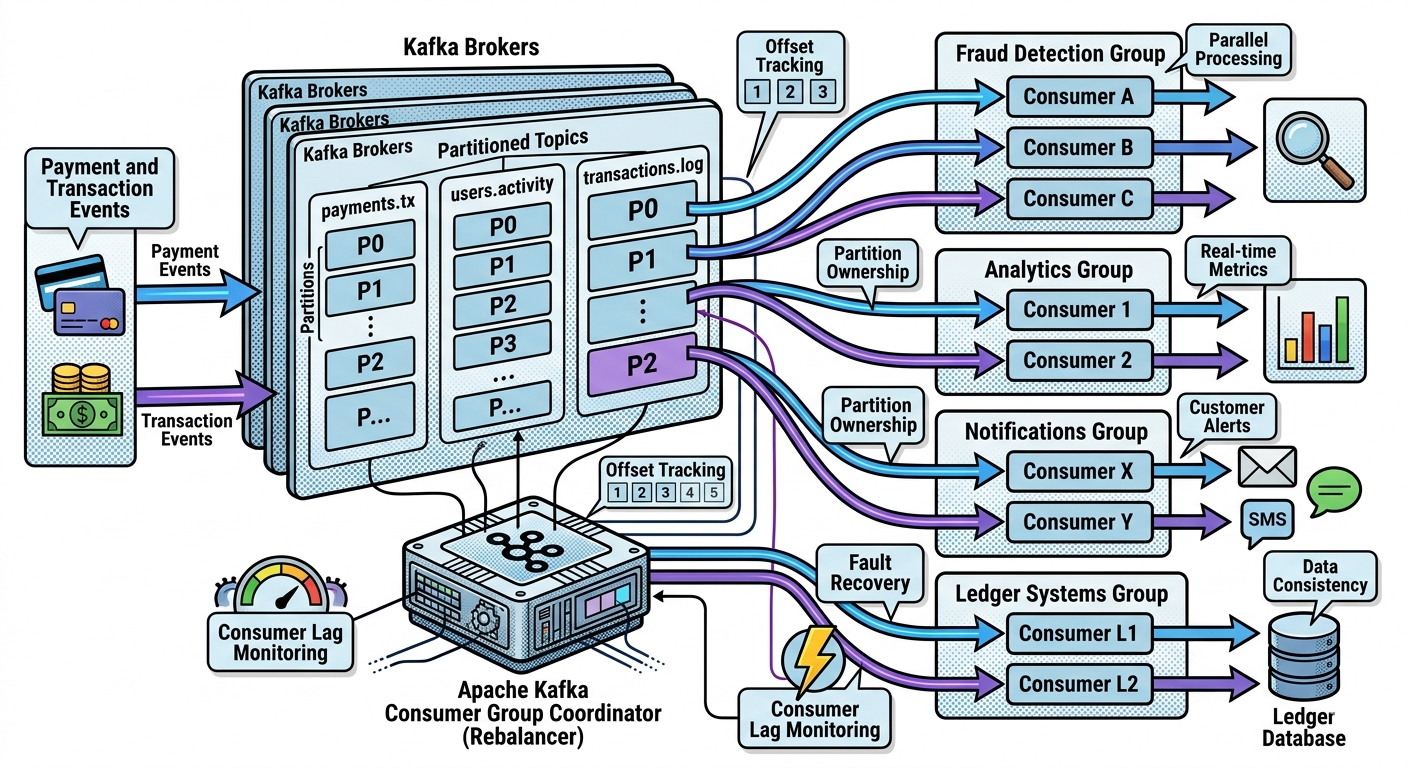
Consumer Group
   ├── Consumer A
   ├── Consumer B
   └── Consumer C
Kafka assigns partitions across consumers.
The Core Rule of Consumer Groups
Within a consumer group:
One partition can be consumed by only one consumer at a time.
This rule is critical.
Why This Rule Exists
Kafka guarantees:
- ordering within partitions
If multiple consumers processed same partition simultaneously:
- ordering would break
- duplicates would increase
- state consistency would become difficult
Understanding Partition Assignment
Suppose topic:
payments topic
 ├── Partition 0
 ├── Partition 1
 └── Partition 2
Consumer group:
Consumer A
Consumer B
Consumer C
Kafka may assign:
Consumer A → Partition 0
Consumer B → Partition 1
Consumer C → Partition 2
Now processing happens in parallel.
Why This is Powerful
Instead of:
- one consumer processing everything
Kafka enables:
- distributed event processing
- scalable throughput
- independent parallel consumers
This is one reason Kafka scales so effectively.
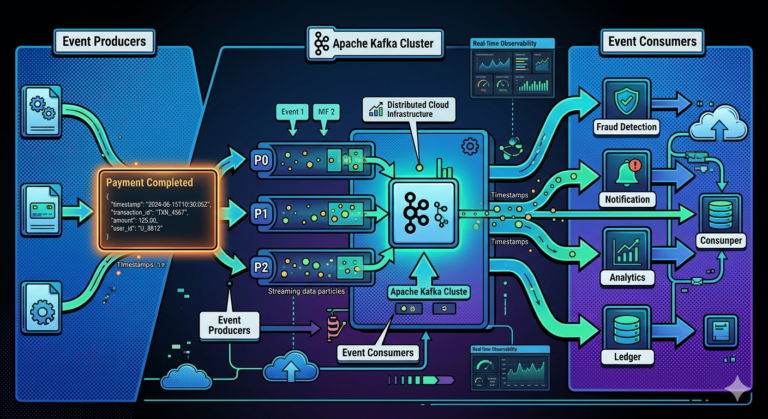
Real-World Example — Payment Processing
Suppose millions of transactions arrive continuously.
Kafka partitions distribute events.
Consumer group processes:
- fraud checks
- ledger updates
- notifications
- analytics
in parallel across consumers.
This dramatically improves throughput.
Consumer Groups vs Independent Consumers
This distinction is important.
Independent Consumers
Suppose two separate consumer groups:
Fraud Group
Analytics Group
Both groups receive:
- full copy of topic events
Consumers Within Same Group
Consumers inside same group:
- share workload
They do NOT each receive all events.
This distinction is fundamental.
Example Visualization
payments topic
   ↓
Fraud Group
 ├── Consumer A
 └── Consumer B

payments topic
   ↓
Analytics Group
 ├── Consumer X
 └── Consumer Y
Each group independently consumes topic.
Why This Architecture Matters
Kafka supports both:
- fan-out messaging
- parallel processing
simultaneously.
This is one of Kafka’s greatest architectural strengths.
Scaling Consumers Horizontally
Suppose payment traffic increases dramatically.
Kafka scaling approach:
Add more consumers to group
Now workload distributes automatically.
This is:
Horizontal scaling.
Important Scaling Limitation
Maximum parallelism depends on:
Number of partitions.
Example:
3 partitions
5 consumers
Result:
- 2 consumers remain idle
Because:
- only 3 partitions exist
Critical Kafka Insight
Maximum consumer parallelism equals:
Partition count
This is one of the most important Kafka operational concepts.
Why Partition Planning Matters
Too few partitions:
- limited scalability
Too many partitions:
- metadata overhead
- rebalance complexity
- operational costs
Partition count becomes:
A strategic architectural decision.
Consumer Offsets in Groups
Each consumer group tracks:
Its own offsets.
Example:
Fraud Group → Offset 5000
Analytics Group → Offset 4800
Audit Group → Offset 3000
Groups operate independently.
Why Independent Offsets Matter
Different systems process at different speeds.
Examples:
- analytics may process quickly
- audits may replay history slowly
Kafka supports both simultaneously.
Understanding Rebalancing
Suppose:
Consumer B crashes
Kafka automatically:
- redistributes partitions
- reassigns ownership
This process is called:
Rebalancing.
Example Rebalance
Before failure:
Consumer A → Partition 0
Consumer B → Partition 1
Consumer C → Partition 2
After Consumer B crashes:
Consumer A → Partition 0
Consumer C → Partition 1,2
Kafka maintains continuity automatically.
Why Rebalancing Exists
Kafka ensures:
- every partition has active consumer
This provides:
- fault tolerance
- high availability
- workload recovery
Rebalancing Tradeoffs
Rebalancing can temporarily pause processing.
Large systems may experience:
- short interruptions
- state migration overhead
- processing delays
Modern Kafka improvements reduced rebalance impact significantly.
Static Membership
Modern Kafka supports:
Static membership.
This reduces unnecessary rebalances during:
- rolling deployments
- temporary disconnects
Useful in production environments.
Consumer Lag Explained
Consumer lag means:
Messages produced
minus
messages consumed
Example:
Latest Offset = 10000
Consumer Offset = 9500
Lag = 500
Why Lag Matters
Lag indicates:
- processing delays
- bottlenecks
- overloaded consumers
High lag can create:
- delayed analytics
- stale dashboards
- slow fraud detection
Monitoring lag is extremely important.
Causes of High Lag
Lag may occur because of:
- slow processing logic
- insufficient consumers
- too few partitions
- database bottlenecks
- network issues
Kafka Automatically Handles Failures
Suppose consumer crashes mid-processing.
Kafka:
- detects failure
- triggers rebalance
- reassigns partitions
Other consumers continue processing.
This creates resilient systems.
Real-World Example — Fraud Detection
Suppose fraud detection cluster contains:
20 consumers
Kafka distributes:
- transaction partitions
- evenly across consumers
As traffic grows:
- additional consumers added
Kafka scales dynamically.
Consumer Groups and Microservices
In event-driven architectures:
- each microservice often forms its own consumer group
Example:
payments topic
 ├── Fraud Group
 ├── Analytics Group
 ├── Ledger Group
 └── Notification Group
Each service processes independently.
Why Kafka Consumer Groups Are So Powerful
Consumer groups combine:
- scalability
- fault tolerance
- distributed processing
- replayability
- independent workflows
Few systems implement this model as elegantly as Kafka.
Consumer Group Coordination
Kafka internally coordinates:
- partition ownership
- offset tracking
- rebalances
- heartbeat monitoring
Historically this involved:
Apache ZooKeeper
Modern Kafka increasingly uses:
- KRaft metadata management
Heartbeats and Session Timeouts
Consumers send:
Heartbeats
to Kafka periodically.
If heartbeats stop:
- Kafka assumes consumer failed
- rebalance begins
Why Heartbeats Matter
Heartbeats help Kafka maintain:
- group health
- failure detection
- partition ownership consistency
Critical for reliable distributed processing.
Consumer Groups and Ordering
Kafka preserves ordering because:
- one partition maps to one consumer at a time
This maintains:
- sequential event processing
within each partition.
Real-World Example — Food Delivery Platform
Suppose topic:
delivery-events
Consumers handle:
- driver matching
- pricing
- notifications
- analytics
Consumer groups enable:
- massive parallel event processing
- real-time responsiveness
Common Beginner Misconceptions
Misconception 1
Every consumer receives every message
Only separate consumer groups receive full copies.
Misconception 2
More consumers always improve scaling
Scaling limited by partition count.
Misconception 3
Kafka automatically eliminates lag
Applications still require efficient processing.
Misconception 4
Consumer groups are optional advanced features
Consumer groups are central to Kafka scalability.
Why Consumer Groups Are the Heart of Kafka Scalability
Consumer groups enable:
- distributed event processing
- horizontal scalability
- fault-tolerant workloads
- real-time stream processing
Without consumer groups:
Apache Kafka
would not achieve its extraordinary scalability and throughput characteristics.
Key Takeaways
Consumer groups allow:
- multiple consumers to work together
- partitions to distribute across consumers
- parallel event processing
Kafka guarantees:
- one partition consumed by one consumer within a group
This preserves:
- partition ordering
- processing consistency
Consumer groups enable:
- horizontal scalability
- fault tolerance
- distributed processing
- workload balancing
Kafka automatically manages:
- partition assignment
- consumer failure recovery
- rebalancing
- offset tracking
making consumer groups one of the most important foundations of scalable event-driven architectures.