Kafka Architecture Deep Dive
Understanding How Kafka Internally Achieves Scalability, Durability, and High Throughput
At this point in the series, we have explored:
- producers
- consumers
- topics
- partitions
- consumer groups
- retention
- replayability
- event sourcing
- CQRS
- stream processing
Now it is time to answer a much deeper question:
How does Kafka internally work?
Why can:
Apache Kafka
handle:
- millions of events per second
- distributed streaming workloads
- durable event retention
- fault-tolerant processing
- massive scalability
while many traditional systems struggle?
The answer lies in Kafka’s architecture.
Kafka’s architecture combines:
- distributed systems design
- append-only logs
- partitioned scalability
- replication
- pull-based consumption
- sequential disk I/O
- decentralized processing
into one of the most influential infrastructure systems ever built.
In this article, we will deeply explore:
- Kafka internal architecture
- brokers
- partitions
- leaders and followers
- replication
- metadata management
- request flow
- storage internals
- networking model
- fault tolerance
- scalability principles
This article connects all earlier Kafka concepts into one complete architectural understanding.
High-Level Kafka Architecture
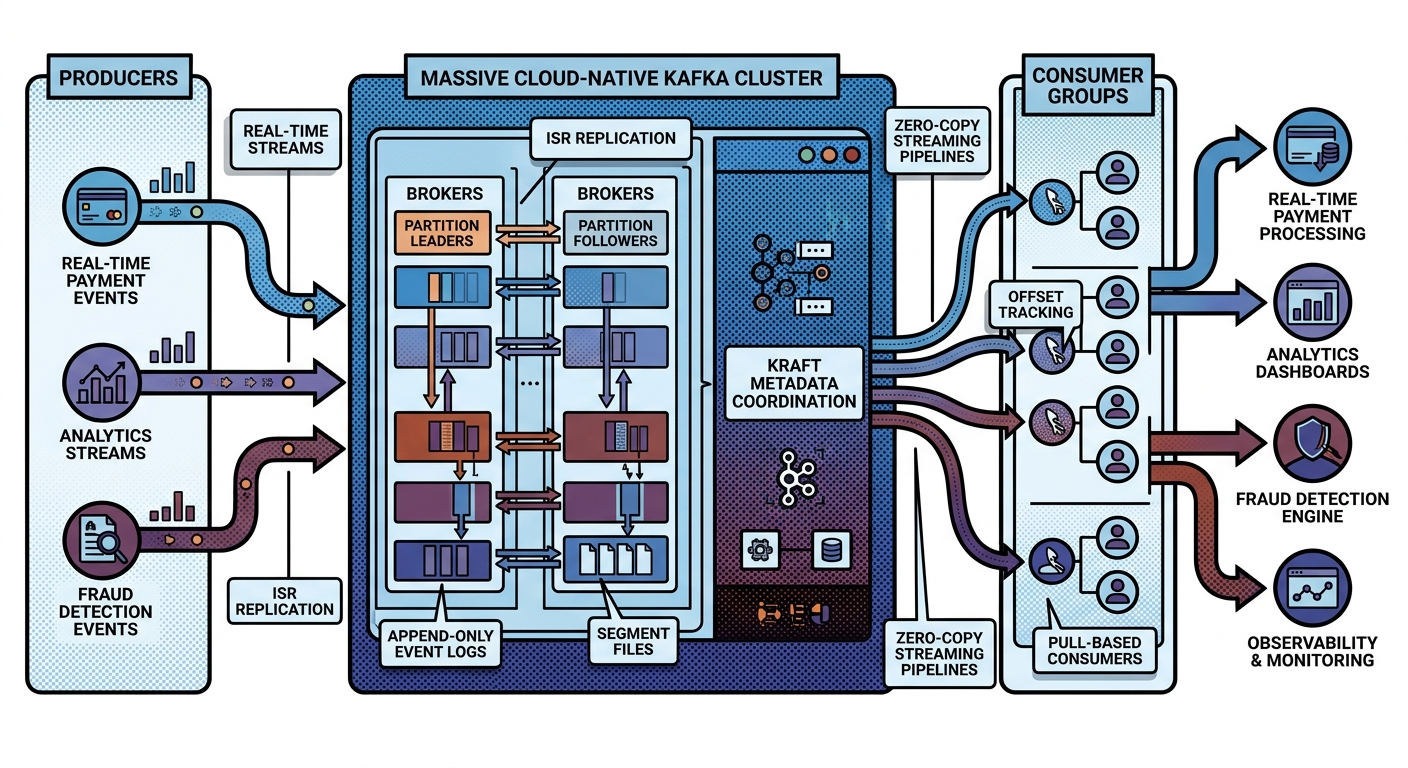
At a high level, Kafka consists of:
Producers
   ↓
Kafka Cluster
   ↓
Consumers
But internally, the architecture is far more sophisticated.
Core Kafka Components
The major architectural components include:
| Component | Responsibility |
|---|---|
| Brokers | Store and serve events |
| Topics | Logical event streams |
| Partitions | Scalable ordered logs |
| Producers | Publish records |
| Consumers | Read records |
| Consumer Groups | Parallel processing |
| Controllers | Metadata coordination |
| Replication | Fault tolerance |
Together, these create Kafka’s distributed event streaming model.
Understanding Kafka Brokers
A Kafka broker is:
A Kafka server node.
Brokers:
- store partitions
- handle reads/writes
- replicate data
- coordinate clients
A Kafka cluster contains:
- multiple brokers
Example:
Broker 1
Broker 2
Broker 3
Why Multiple Brokers Exist
Multiple brokers provide:
- scalability
- distributed storage
- fault tolerance
- high availability
Without multiple brokers:
- Kafka would become a single bottleneck.
Topics Are Logical Categories
Topics organize events logically.
Examples:
payments
orders
shipments
logs
Topics themselves are:
- logical abstractions
Internally:
- topics are split into partitions.
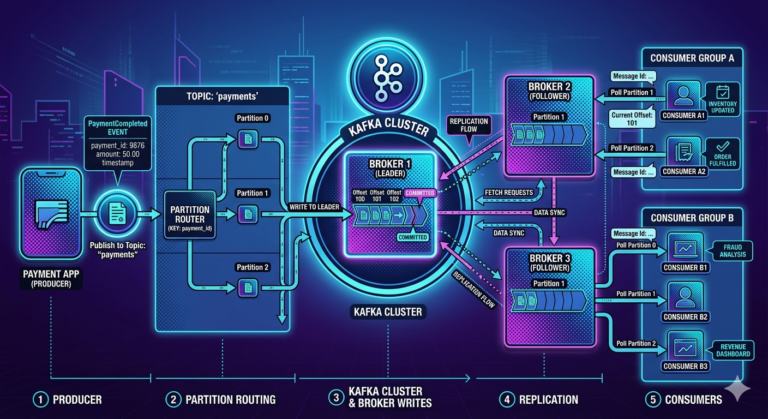
Partitions Are the Real Storage Units
Partitions are:
Ordered append-only logs.
Example:
payments topic
 ├── Partition 0
 ├── Partition 1
 └── Partition 2
Partitions are the foundation of Kafka scalability.
Why Partitions Matter So Much
Partitions enable:
- horizontal scalability
- parallel processing
- distributed storage
- consumer scaling
Without partitions:
- Kafka could not scale efficiently.
Partition Distribution Across Brokers
Partitions distribute across brokers.
Example:
Broker 1 → Partition 0
Broker 2 → Partition 1
Broker 3 → Partition 2
This distributes:
- storage
- network load
- processing traffic
across the cluster.
Kafka as Distributed Logs
Each partition behaves like:
Sequential Append-Only Log
Records are appended continuously:
Offset 0
Offset 1
Offset 2
Kafka avoids random updates.
This design is extremely important.
Why Append-Only Architecture Is Fast
Sequential writes are highly efficient for:
- disks
- operating systems
- file systems
Kafka achieves extraordinary throughput partly because:
- sequential appends are cheap.
Producers and Write Flow
Producers send records into Kafka.
Workflow:
Producer
   ↓
Broker Leader Partition
   ↓
Partition Log Append
Producer does not write randomly anywhere.
Kafka routes records deterministically.
Leader Partitions
Every partition has:
One leader.
Example:
Partition 0 Leader → Broker 1
All reads/writes go through:
- partition leader
Follower Replicas
Kafka also maintains:
Replica followers.
Example:
Partition 0
 ├── Leader → Broker 1
 ├── Follower → Broker 2
 └── Follower → Broker 3
Followers replicate data continuously.
Why Replication Exists
Replication provides:
- fault tolerance
- durability
- high availability
If one broker fails:
- another replica can become leader.
In-Sync Replicas (ISR)
Kafka tracks:
In-Sync Replicas.
These are replicas fully caught up with leader.
Example:
ISR = [Broker1, Broker2, Broker3]
Kafka uses ISR for:
- reliability decisions
- failover selection
Producer Acknowledgment Flow
Producer writes:
Producer
   ↓
Leader Partition
   ↓
Replicas Synchronize
   ↓
Acknowledgment Returned
Acknowledgment settings affect:
- durability
- latency
- reliability
acks Configuration
Important producer settings:
| Setting | Meaning |
|---|---|
| acks=0 | Fire and forget |
| acks=1 | Leader acknowledgment |
| acks=all | Full ISR acknowledgment |
Why acks=all Matters
With:
acks=all
Kafka waits for:
- all in-sync replicas
before confirming write.
This improves durability significantly.
Consumers and Read Flow
Consumers fetch records using:
Pull-based consumption.
Workflow:
Consumer
   ↓
Poll Request
   ↓
Broker Returns Records
Consumers control:
- reading speed
- batching
- backpressure
Why Pull-Based Architecture Matters
Pull-based design improves:
- scalability
- flow control
- consumer independence
Compared to push-based systems:
- Kafka consumers scale more predictably.
Consumer Offsets
Consumers track:
Offsets.
Example:
Consumer Offset = 5000
Offsets indicate:
- current read position
Kafka itself does not track message deletion per consumer.
This is a critical architectural distinction.
Why Independent Offsets Matter
Different consumers can:
- process at different speeds
- replay history independently
- recover independently
This enables:
- replayability
- asynchronous architectures
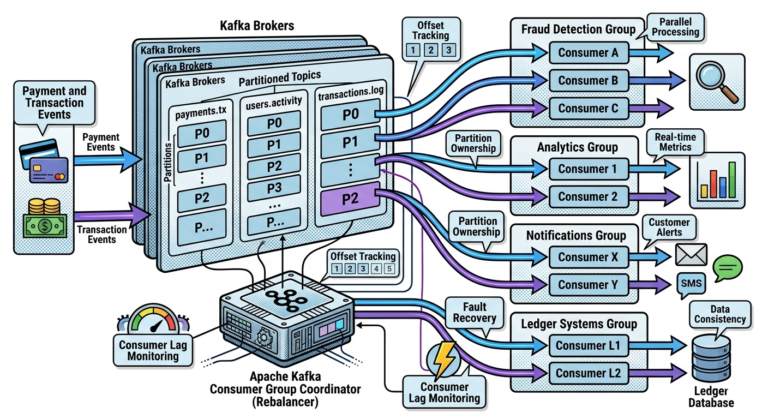
Consumer Groups Internally
Consumer groups coordinate:
- partition ownership
Example:
Partition 0 → Consumer A
Partition 1 → Consumer B
Kafka guarantees:
- one partition per consumer within group
to preserve ordering.
Rebalancing
When consumers:
- join
- leave
- fail
Kafka redistributes partitions.
This process is:
Rebalancing.
Why Rebalancing Exists
Kafka ensures:
- all partitions remain assigned
- workloads stay balanced
This provides:
- scalability
- fault recovery
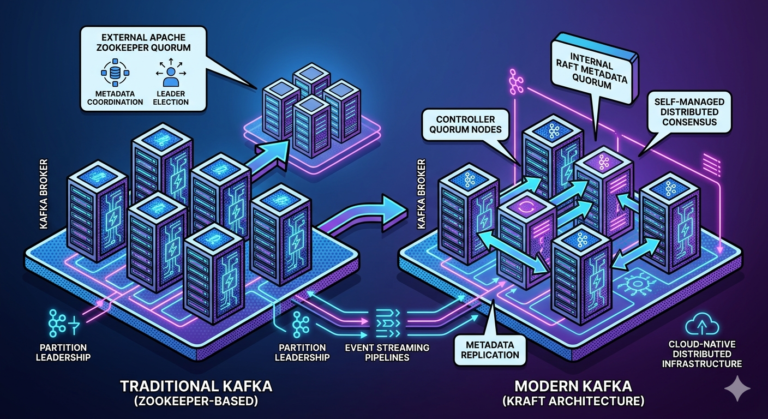
Metadata Management
Kafka clusters require metadata coordination.
Metadata includes:
- topics
- partitions
- leaders
- ISR
- consumer groups
Historically managed by:
Apache ZooKeeper
Modern Kafka increasingly uses:
KRaft mode.
What KRaft Changed
KRaft removes:
- ZooKeeper dependency
Benefits:
- simpler architecture
- better scalability
- reduced operational complexity
This is a major evolution in Kafka architecture.
Segment Files
Kafka stores partitions using:
Segment files.
Instead of:
- one giant log file
Kafka splits logs into manageable chunks.
Example:
payments-0001.log
payments-0002.log
payments-0003.log
Why Segment Files Matter
Segments improve:
- retention cleanup
- storage management
- indexing efficiency
Critical for large-scale retention systems.
Kafka Indexes
Kafka maintains indexes for:
- fast offset lookup
This enables:
- efficient consumer reads
- rapid replay positioning
without scanning entire logs.
Page Cache Optimization
Kafka heavily relies on:
Operating system page cache.
Instead of excessive JVM memory management:
- Kafka leverages OS caching efficiently.
This significantly improves:
- disk I/O performance
- throughput
Zero-Copy Transfer
Kafka uses:
Zero-copy optimization.
Data moves:
- directly from disk to network socket
without unnecessary application copying.
This dramatically improves:
- network throughput
- CPU efficiency
Why Kafka Is So Fast
Kafka performance comes from combining:
- sequential writes
- batching
- partition parallelism
- pull-based consumers
- page cache usage
- zero-copy transfer
The architecture is optimized end-to-end for streaming workloads.
Kafka Networking Model
Kafka uses:
- TCP-based networking
- persistent client connections
Efficient networking is critical for:
- large-scale streaming throughput
Durability and Fault Tolerance
Kafka achieves durability through:
- replication
- ISR coordination
- persistent storage
Failures are expected in distributed systems.
Kafka architecture assumes:
Hardware failure is normal.
Failover Example
Suppose:
Broker 1 crashes
Kafka:
- elects new leader
- continues serving clients
Consumers and producers reconnect automatically.
Scalability Model
Kafka scales horizontally by:
- adding brokers
- increasing partitions
- expanding consumer groups
This enables:
- petabyte-scale streaming systems.
Why Kafka Handles Massive Workloads
Kafka distributes:
- storage
- networking
- processing
- consumers
across:
- many machines
This decentralized architecture enables massive scalability.
Real-World Example — Payment Infrastructure
Large payment systems may process:
- millions of transactions
- thousands of partitions
- hundreds of brokers
Kafka architecture enables:
- distributed fault-tolerant event streaming
at enterprise scale.
Real-World Example — Observability
Observability platforms stream:
- logs
- traces
- metrics
through Kafka clusters containing:
- enormous distributed event pipelines
Architectural Tradeoffs
Kafka architecture prioritizes:
- throughput
- scalability
- durability
Tradeoffs include:
- operational complexity
- eventual consistency
- partition management challenges
No distributed system gets everything perfectly.
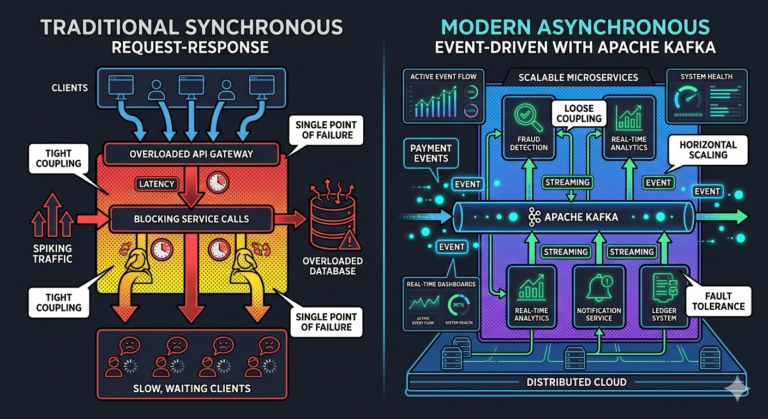
Why Kafka Changed Distributed Systems
Kafka unified:
- messaging
- storage
- streaming
- replayability
- distributed logs
into one platform.
This architectural model transformed:
- microservices
- analytics
- event-driven architectures
- cloud-native infrastructure
Common Beginner Misconceptions
Misconception 1
Topics directly store messages
Partitions are the actual storage units.
Misconception 2
Kafka is memory-based only
Kafka persists data durably on disk.
Misconception 3
Consumers receive pushed messages automatically
Consumers poll Kafka actively.
Misconception 4
Replication eliminates all failures instantly
Distributed failover still involves coordination complexity.
Why Kafka Architecture Became So Influential
Kafka architecture solved modern challenges involving:
- real-time data movement
- distributed scalability
- durable event retention
- replayable event history
- cloud-native streaming systems
This is why:
Apache Kafka
became one of the most influential distributed infrastructure technologies in modern software engineering.
Key Takeaways
Kafka architecture combines:
- brokers
- partitions
- replication
- consumer groups
- append-only logs
- distributed storage
to achieve:
- massive scalability
- high throughput
- durability
- fault tolerance
Partitions are:
- the core scalability unit
Replication provides:
- resilience and failover
Consumers use:
- pull-based processing
- independent offset tracking
Kafka’s performance comes from:
- sequential writes
- batching
- partition parallelism
- page cache optimization
- zero-copy networking
Together, these architectural principles make:
Apache Kafka
one of the most powerful distributed event streaming systems ever built.