How Messages Flow Inside Kafka
Understanding the End-to-End Lifecycle of a Kafka Event
One of the reasons:
Apache Kafka
became so successful is because of its extremely efficient internal message flow architecture.
At first glance, Kafka appears simple:
Producer → Kafka → Consumer
But internally, Kafka performs a sophisticated sequence of operations involving:
- partition routing
- append-only writes
- replication
- leader coordination
- offset tracking
- consumer polling
- fault tolerance
Understanding how messages flow inside Kafka is critical for:
- debugging Kafka systems
- designing scalable architectures
- tuning performance
- understanding delivery guarantees
- troubleshooting consumer lag
- building reliable event-driven systems
In this article, we will deeply explore:
- the Kafka message lifecycle
- producer workflow
- broker internals
- partition writes
- replication
- consumer polling
- offset commits
- end-to-end event flow
This article helps bridge the gap between conceptual Kafka understanding and operational Kafka knowledge.
The Big Picture
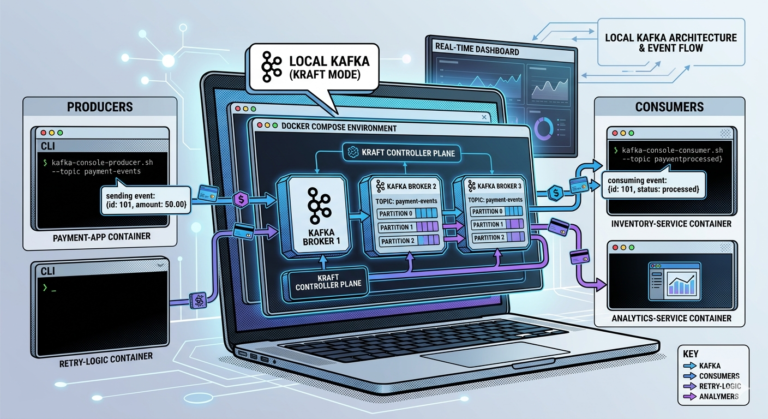
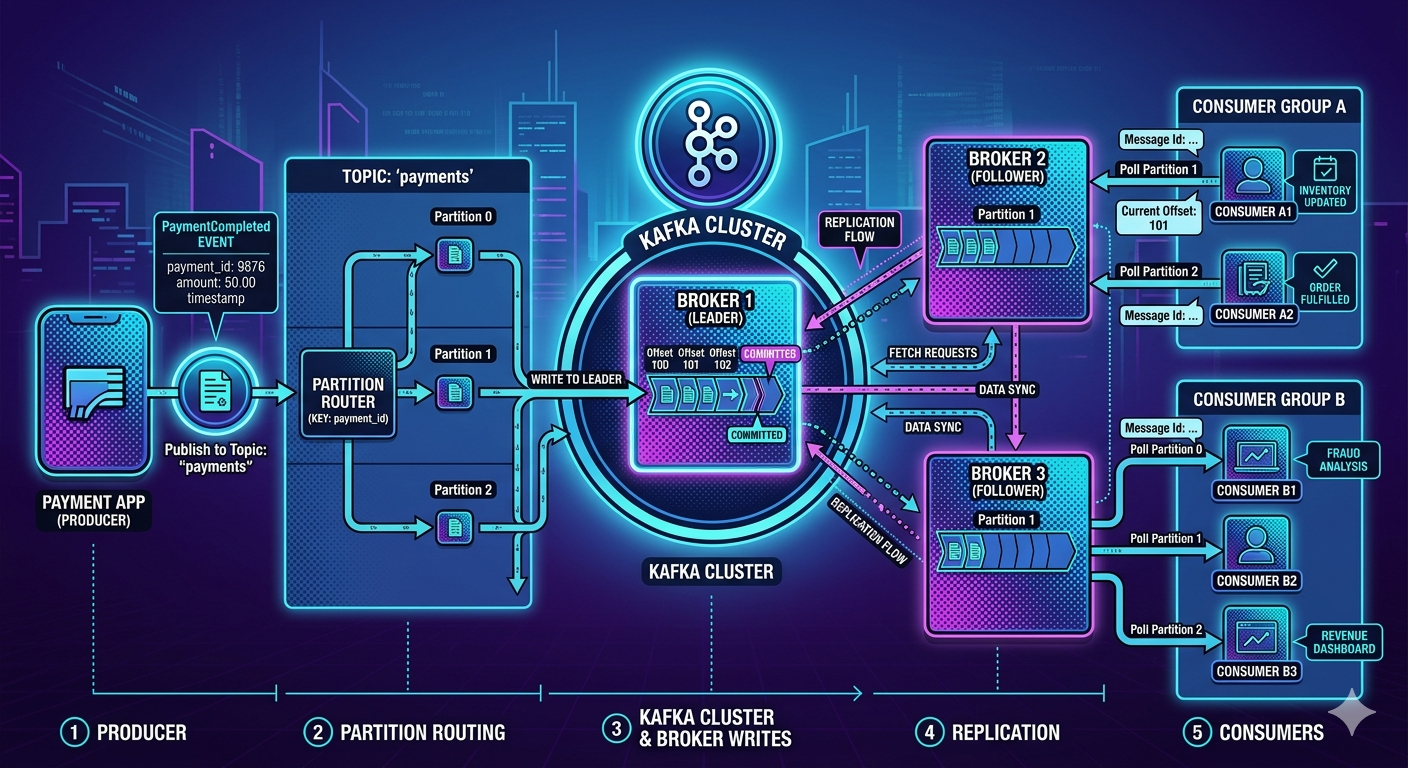
A Kafka message typically flows through these stages:
Producer
   ↓
Partition Selection
   ↓
Broker Leader
   ↓
Partition Write
   ↓
Replication
   ↓
Consumer Polling
   ↓
Offset Commit
Each stage exists for specific architectural reasons.
Real-World Example — Payment Processing
Suppose an online payment succeeds.
The payment service produces an event:
{
  "eventType": "PaymentCompleted",
  "transactionId": "TXN5001",
  "customerId": "CUST100",
  "amount": 2500
}
This event begins its journey through Kafka.
Let us follow it step by step.
Step 1 — Producer Creates the Event
The producer application:
- constructs the event
- serializes the data
- prepares the Kafka request
Example producer responsibilities:
- choosing topic
- assigning key
- selecting partition strategy
- compressing payload
- batching messages
Example Producer Flow
Payment Service
   ↓
Creates PaymentCompleted event
   ↓
Publishes to payments topic
At this stage:
- Kafka has not stored the message yet
- the event exists only inside producer memory
Step 2 — Producer Chooses a Partition
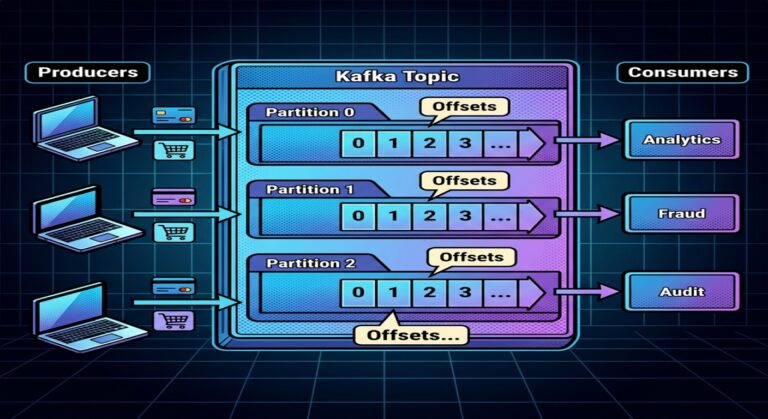
Kafka topics are divided into partitions.
Example:
payments topic
 ├── Partition 0
 ├── Partition 1
 ├── Partition 2
The producer must decide:
Which partition should receive the event?
How Partition Selection Happens
Kafka producers typically use one of these approaches:
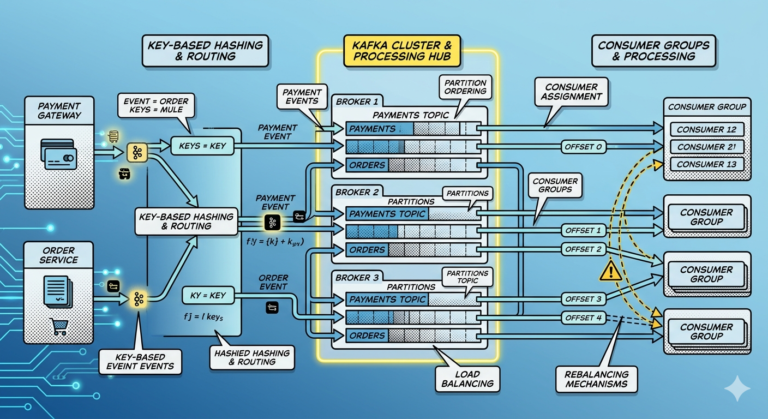
1. Key-Based Partitioning
Example key:
customerId = CUST100
Kafka hashes the key:
hash(customerId) % partitionCount
This ensures:
- events for the same customer go to the same partition
- ordering is preserved
2. Round Robin Partitioning
If no key is provided:
- Kafka distributes events evenly across partitions
Useful for:
- load balancing
- maximum throughput
But ordering relationships may not be preserved.
Why Partition Selection Matters
Partition assignment affects:
- ordering guarantees
- parallelism
- scalability
- consumer distribution
Bad partition strategy can create:
- hotspots
- uneven load
- ordering issues
Step 3 — Producer Sends Message to Broker Leader
Each partition has:
- one leader replica
- optional follower replicas
Example:
Partition 0
 ├── Leader → Broker 1
 ├── Follower → Broker 2
 └── Follower → Broker 3
The producer always writes:
To the partition leader.
Why Leaders Exist
Leaders simplify:
- consistency
- ordering
- coordination
Without leaders:
- distributed writes become chaotic
- ordering breaks
- conflicts increase
Step 4 — Broker Writes Event to Partition Log
The leader broker receives the event.
Kafka then:
- appends the event sequentially
- assigns an offset
- writes to disk
Example:
Partition 0

Offset 1050 → PaymentCompleted
This append-only design is central to Kafka performance.
Why Sequential Writes Are Fast
Kafka avoids expensive random writes.
Instead:
- events append continuously
- disk access becomes highly optimized
Sequential writes are extremely efficient on:
- SSDs
- modern disks
- filesystem caches
This is one reason Kafka achieves enormous throughput.
Step 5 — Kafka Replicates the Event
If replication is enabled:
Kafka copies the event to follower replicas.
Example:
Leader → Broker 1
Followers → Broker 2, Broker 3
This replication provides:
- durability
- fault tolerance
- high availability
In-Sync Replicas (ISR)
Kafka tracks replicas that remain synchronized.
These are called:
In-Sync Replicas (ISR)
ISR replicas:
- stay up to date
- can become leaders if failure occurs
Why Replication Matters
Without replication:
- broker failure = data loss
With replication:
- brokers can fail safely
- Kafka remains operational
This is critical for production systems.
Step 6 — Broker Acknowledges Producer
After writing and replication, Kafka sends acknowledgment back to producer.
Depending on configuration:
- acknowledgment may occur immediately
- or after replicas confirm writes
Producer configuration:
acks=0
acks=1
acks=all
affects reliability and latency.
Understanding Acknowledgment Modes
acks=0
Producer does not wait for confirmation.
Fastest.
Least reliable.
acks=1
Leader acknowledges after local write.
Balanced approach.
Common default.
acks=all
Leader waits for ISR replication.
Most reliable.
Higher latency.
Used for critical systems like payments.
Step 7 — Consumers Poll Kafka
Consumers do not receive messages automatically.
Instead:
Consumers continuously poll Kafka.
Example:
Consumer → poll()
Kafka returns available records from assigned partitions.
Consumer Polling Model
This is important.
Kafka uses:
Pull-based consumption
NOT push-based delivery.
Consumers control:
- reading speed
- batch size
- processing rate
This improves scalability.
Why Pull-Based Consumption is Powerful
Consumers process data at their own pace.
Benefits:
- avoids overload
- supports backpressure
- improves stability
- enables batching
Step 8 — Consumer Processes the Event
Consumer logic executes.
Example fraud detection service:
PaymentCompleted
   ↓
Analyze transaction risk
   ↓
Generate FraudDetected event if suspicious
Each consumer operates independently.
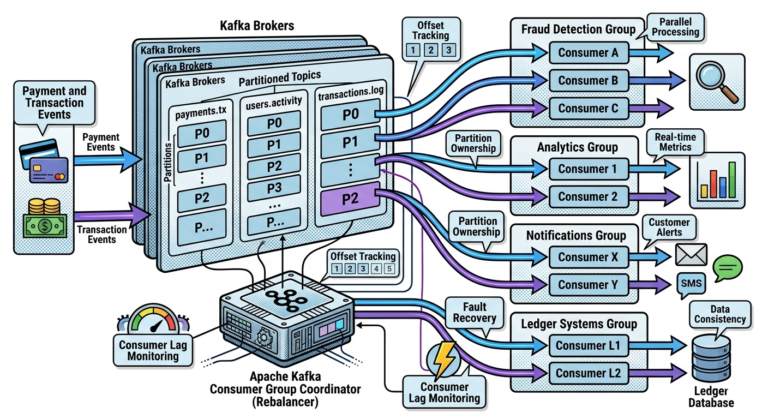
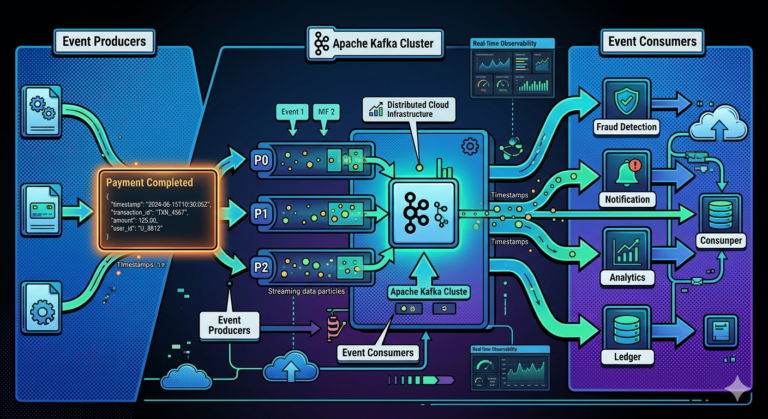
Multiple Consumers Can Process the Same Event
One event may trigger:
PaymentCompleted
 ├── Fraud Detection
 ├── Analytics
 ├── Notification Service
 └── Ledger Service
This is one of Kafka’s biggest architectural advantages.
Step 9 — Consumer Commits Offset
After processing:
- consumer records progress
Example:
Committed Offset = 1050
This tells Kafka:
“I successfully processed up to this point.”
Why Offset Commits Matter
Offsets enable:
- restart recovery
- replayability
- failure handling
- consumer independence
Without offsets:
- reliable processing becomes impossible
Auto Commit vs Manual Commit
Consumers may:
- auto commit offsets
- manually commit offsets
Auto Commit
Kafka periodically commits automatically.
Simpler.
But can risk:
- duplicates
- message loss
Manual Commit
Application explicitly commits after successful processing.
More reliable.
Common in production systems.
What Happens if Consumer Crashes?
Suppose:
Processed Offset 1050
Crash before committing
After restart:
- Kafka resumes from previous committed offset
- some events may reprocess
This leads to:
At-least-once delivery behavior.
We will explore delivery guarantees deeply later.
Understanding End-to-End Flow
Complete flow:
Producer
   ↓
Partition Selection
   ↓
Leader Broker
   ↓
Partition Append
   ↓
Replication
   ↓
Consumer Poll
   ↓
Processing
   ↓
Offset Commit
This entire pipeline happens continuously at massive scale.
Why Kafka Handles Massive Throughput
Kafka’s design optimizes:
- sequential writes
- batching
- partition parallelism
- pull-based consumption
- distributed storage
This enables:
- millions of events per second
- low latency
- high scalability
Message Batching
Kafka batches records internally.
Instead of:
1 request per message
Kafka sends:
- batches of events together
Benefits:
- lower network overhead
- better throughput
- disk efficiency
Kafka is Designed for Streaming
Traditional systems often think:
Request → Response
Kafka systems think:
Continuous Event Streams
This is a fundamentally different architectural mindset.
Real-World Example — Fraud Detection Pipeline
Imagine:
- thousands of payments per second
- Kafka distributing transaction streams
- fraud detection consumers processing partitions in parallel
- analytics dashboards updating live
All powered by Kafka’s internal message flow architecture.
Common Beginner Misconceptions
Misconception 1
Kafka pushes messages to consumers
Consumers poll Kafka.
Misconception 2
Offsets are global
Offsets are partition-specific.
Misconception 3
Consumers automatically guarantee exactly-once processing
Delivery semantics depend on:
- offset management
- retries
- idempotency
- transactions
Misconception 4
Replication means every broker handles every message
Replication happens only for assigned partition replicas.
Why Understanding Message Flow Matters
Understanding internal flow helps engineers:
- tune performance
- design scalable systems
- troubleshoot lag
- optimize partition strategy
- understand delivery guarantees
- debug failures
This knowledge becomes essential in production Kafka environments.
Key Takeaways
Kafka message flow consists of:
- producer event creation
- partition selection
- leader writes
- replication
- consumer polling
- offset commits
Kafka achieves scalability through:
- partitions
- batching
- sequential writes
- distributed brokers
- pull-based consumption
These architectural decisions make:
Apache Kafka
one of the most scalable and reliable event streaming platforms ever built.